詳說tcp粘包和半包

tcp服務端和客戶端建立連接後會長時間維持這個連接,用於互相傳遞數據,tcp是以流的方式傳輸數據的,就像一個水管里的水一樣,從一頭不斷的流向另一頭。
理想情況下,發送的數據包都是獨立的,

現實要複雜一些,發送方和接收方都有各自的緩衝區。
發送緩衝區:應用不斷的把數據發送到緩衝區,系統不斷的從緩衝區取數據發送到接收端。
接收緩衝區:系統把接收到的數據放入緩衝區,應用不斷的從緩衝區獲取數據。
當發送方快速的發送多個數據包時,每個數據包都小於緩衝區,tcp會將多次寫入的數據放入緩衝區,一次發送出去,服務器在接收到數據流無法區分哪部分數據包獨立的,這樣產生了粘包。

或者接收方因為各種原因沒有從緩衝區里讀取數據,緩衝區的數據會積壓,等再取出數據時,也是無法區分哪部分數據包獨立的,一樣會產生粘包。
發送方的數據包大於緩存區了,其中有一部分數據會在下一次發送,接收端一次接收到時的數據不是完整的數據,就會出現半包的情況。

我們可以還原一下粘包和半包,寫一個測試代碼
服務端

func main() {
	l, err := net.Listen("tcp", ":8899")
	if err != nil {
		panic(err)
	}
	fmt.Println("listen to 8899")
	for {
		conn, err := l.Accept()
		if err != nil {
			panic(err)
		} else {
			go handleConn(conn)
		}
	}
}

func handleConn(conn net.Conn) {
	defer conn.Close()
	var buf [1024]byte
	for {
		n, err := conn.Read(buf[:])
		if err != nil {
			break
		} else {
			fmt.Printf("recv: %s \n", string(buf[0:n]))
		}
	}
}

客戶端

func main() {
	data := []byte("~測試數據:一二三四五~")
	conn, err := net.Dial("tcp", ":8899")
	if err != nil {
		panic(err)
	}
	for i := 0; i < 2000; i++ {
		if _, err = conn.Write(data); err != nil {
			fmt.Printf("write failed , err : %v\n", err)
			break
		}
	}
}

查看一下輸出

recv: ~測試數據:一二三四五~
recv: ~測試數據:一二三四五~ ~測試數據:一二三四五~ 
recv: ~測試數據:一� 
recv: ��三四五~ ~測試數據:一二三四五~ 
recv: ~測試數據:一二三四五~
recv: ~測試數據:一二三四五~ ~測試數據:一二三四五~ ~測試數據:一二三四五~ ~測試數據:一二三四五~ 
recv: ~測試數據:一二三四五~

正常情況下輸出是recv: ~測試數據:一二三四五~,發生粘包的時候會輸出多個數據包,當有半包的情況下輸出的是亂碼數據,再下一次會把剩下的半包數據也輸出。
要解決也簡單的就想辦法確定數據的邊界,常見的處理方式:

  • 固定長度: 比如規定所有的數據包長度為100byte,如果不夠則補充至100長度。優點就是實現很簡單,缺點就是空間有極大的浪費,如果傳遞的消息中大部分都比較短,這樣就會有很多空間是浪費的,同樣浪費的還有流量。
  • 分隔符:用分隔符來確定數據的邊界,這樣做比較簡單也不浪費空間,但數據包內就不能包含相應的分隔符,如果有會造成錯誤的解析。
  • 數據頭:通過數據頭部來解析數據包長度,比如用4個字節來當數據頭,保存每個實數據包的長度。

個人更推薦數據頭方式來確定數據邊界,在發送和接收數據時做好規定,每個數據包是不定長的,比如4字節的包頭+真實的數據可以根據自己的業務進行擴展,比如上更多的包頭或者包尾,加上數據校驗等。
我修改一下上面的代碼:
客戶端

	data := []byte("~測試數據:一二三四五~")
	conn, err := net.Dial("tcp", ":8899")
	if err != nil {
		panic(err)
	}
	for i := 0; i < 2000; i++ {
		var buf [4]byte
		bufs := buf[:]
		binary.BigEndian.PutUint32(bufs, uint32(len(data)))
		if _, err := conn.Write(bufs); err != nil {
			fmt.Printf("write failed , err : %v\n", err)
			break
		}
		if _, err = conn.Write(data); err != nil {
			fmt.Printf("write failed , err : %v\n", err)
			break
		}
	}

服務端

func main() {
	l, err := net.Listen("tcp", ":8899")
	if err != nil {
		panic(err)
	}
	fmt.Println("listen to 8899")
	for {
		conn, err := l.Accept()
		if err != nil {
			panic(err)
		} else {
			go handleConn(conn)
		}
	}
}
func handleConn(conn net.Conn) {
	defer conn.Close()
	for {
		var msgSize int32
		err := binary.Read(conn, binary.BigEndian, &msgSize)
		if err != nil {
			break
		}
		buf := make([]byte, msgSize)
		_, err = io.ReadFull(conn, buf)
		if err != nil {
			break
		}
		fmt.Printf("recv: %s \n", string(buf))
	}
}

執行再看一下輸出,沒有粘包或者半包的情況

recv: ~測試數據:一二三四五~ 
recv: ~測試數據:一二三四五~ 
recv: ~測試數據:一二三四五~ 
recv: ~測試數據:一二三四五~ 
recv: ~測試數據:一二三四五~ 
recv: ~測試數據:一二三四五~

也可以像第一個例子一樣用一個指定大小的buf var buf [1024]byte,每次從conn里取出指定大小的數據,然後進行數據解析,如果發現有半包的情況,就再讀取一次,加上上次未解析的數據,再次重新解析。

本站聲明:網站內容來源於博客園,如有侵權,請聯繫我們,我們將及時處理

【其他文章推薦】

網頁設計一頭霧水該從何著手呢? 台北網頁設計公司幫您輕鬆架站!

網頁設計公司推薦不同的風格,搶佔消費者視覺第一線

※Google地圖已可更新顯示潭子電動車充電站設置地點!!

※廣告預算用在刀口上,台北網頁設計公司幫您達到更多曝光效益

※別再煩惱如何寫文案,掌握八大原則!

網頁設計最專業,超強功能平台可客製化

聚甘新

tensorflow-TFRecord 文件詳解

TFRecord 是 tensorflow 內置的文件格式,它是一種二進制文件,具有以下優點:

1. 統一各種輸入文件的操作

2. 更好的利用內存,方便複製和移動

3. 將二進制數據和標籤(label)存儲在同一個文件中


引言

在了解如下操作後進一步詳細講解TFRecord


tf.train.Int64List(value=list_data)

它的作用是 把 list 中每個元素轉換成 key-value 形式,

注意,輸入必須是 list,且 list 中元素類型要相同,且與 Int 保持一致;

# value = tf.constant([1, 2])     ### 這會報錯的
ss = 1               ### Int64List 對應的元素只能是 int long,其他同理
tt = 2
out1 = tf.train.Int64List(value = [ss, tt])
print(out1)
# value: 1
# value: 2

ss = [1 ,2]
out2 = tf.train.Int64List(value = ss)
print(out2)
# value: 1
# value: 2


同類型的 方法還有 2 個

tf.train.FloatList
tf.train.BytesList


tf.train.Feature(int64_list=)

它的作用是 構建 一種類型的特徵集,比如 整型

out = tf.train.Feature(int64_list=tf.train.Int64List(value=[33, 22]))
print(out)
# int64_list {
#   value: 33
#   value: 22
# }

也可以是其他類型

tf.train.Feature(float_list=tf.train.FloatList())
tf.train.Feature(bytes_list=tf.train.BytesList())


tf.train.Features(feature=dict_data)

它的作用是 構建 多種類型 的特徵集,可以 dict 格式表達 多種類型

ut = tf.train.Features(feature={
                            "suibian": tf.train.Feature(int64_list=tf.train.Int64List(value=[1, 2, 4])),
                            "a": tf.train.Feature(float_list=tf.train.FloatList(value=[5., 7.]))
                        })
print(out)
# feature {
#   key: "a"
#   value {
#     float_list {
#       value: 5.0
#       value: 7.0
#     }
#   }
# }
# feature {
#   key: "suibian"
#   value {
#     int64_list {
#       value: 1
#       value: 2
#       value: 4
#     }
#   }
# }


tf.train.Example(features=tf.train.Features())

它的作用是創建一個 樣本,Example 對應一個樣本

example = tf.train.Example(features=
                           tf.train.Features(feature={
                               'a': tf.train.Feature(int64_list=tf.train.Int64List(value=range(2))),
                               'b': tf.train.Feature(bytes_list=tf.train.BytesList(value=[b'm',b'n']))
                           }))
print(example)
# features {
#   feature {
#     key: "a"
#     value {
#       int64_list {
#         value: 0
#         value: 1
#       }
#     }
#   }
#   feature {
#     key: "b"
#     value {
#       bytes_list {
#         value: "m"
#         value: "n"
#       }
#     }
#   }
# }


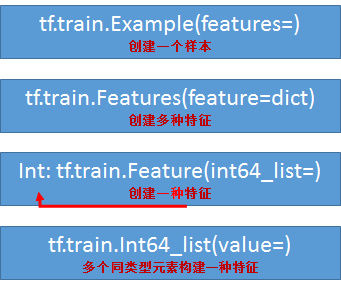
一幅圖總結一下上面的代碼


Example 協議塊

它其實是一種 數據存儲的 格式,類似於 xml、json 等;

用上述方法實現該格式;

一個 Example 協議塊對應一個樣本,一個樣本有多種特徵,每種特徵下有多個元素,可參看上圖;

message Example{
    Features features = 1;
}
message Features{
    map<string,Features> feature = 1;
}
message Feature {
    oneof kind {
        BytesList bytes_list = 1;
        FloateList float_list = 2;
        Int64List int64_list = 3;
    }
}

TFRecord 文件就是以 Example協議塊 格式 存儲的;


TFRecord 文件

該類文件具有寫功能,且可以把其他類型的文件轉換成該類型文件,其實相當於先讀取其他文件,再寫入 TFRecord 文件;

該類文件也具有讀功能;


TFRecord 存儲

存儲分兩步:

1.建立存儲器 

2. 構造每個樣本的 Example 協議塊


tf.python_io.TFRecordWriter(file_name)

構造存儲器,存儲器有兩個常用方法

  • write(record):向文件中寫入一個樣本
  • close():關閉存儲器

注意:此處的 record 為一個序列化的 Example,通過 Example.SerializeToString()來實現,它的作用是將 Example 中的 map 壓縮為二進制,節約大量空間


示例代碼1:將 MNIST 數據集保存成 TFRecord 文件

import tensorflow as tf
import numpy as np
import input_data


# 生成整數型的屬性
def _int64_feature(value):
    return tf.train.Feature(int64_list = tf.train.Int64List(value = [value]))

# 生成字符串類型的屬性,也就是圖像的內容
def _string_feature(value):
    return tf.train.Feature(bytes_list = tf.train.BytesList(value = [value]))

# 讀取圖像數據 和一些屬性
mniset = input_data.read_data_sets('../../../data/MNIST_data',dtype=tf.uint8, one_hot=True)
images = mniset.train.images
labels = mniset.train.labels
pixels = images.shape[1]        # (55000, 784)
num_examples = mniset.train.num_examples        # 55000

file_name = 'output.tfrecords'          ### 文件名
writer = tf.python_io.TFRecordWriter(file_name)     ### 寫入器

for index in range(num_examples):
    ### 遍歷樣本
    image_raw = images[index].tostring()        ### 圖片轉成 字符型
    example = tf.train.Example(features = tf.train.Features(feature = {
        'pixel': _int64_feature(pixels),
        'label': _int64_feature(np.argmax(labels[index])),
        'image_raw': _string_feature(image_raw)
    }))
    writer.write(example.SerializeToString())       ### 寫入 TFRecord
writer.close()


示例代碼2:將 csv 保存成 TFRecord 文件

train_frame = pd.read_csv("../myfiles/xx3.csv")
train_labels_frame = train_frame.pop(item="label")
train_values = train_frame.values
train_labels = train_labels_frame.values
print("values shape: ", train_values.shape)     # values shape:  (2, 3)
print("labels shape:", train_labels.shape)      # labels shape: (2,)

writer = tf.python_io.TFRecordWriter("xx3.tfrecords")

for i in range(train_values.shape[0]):
    image_raw = train_values[i].tostring()
    example = tf.train.Example(
        features=tf.train.Features(
            feature={
                "image_raw": tf.train.Feature(bytes_list=tf.train.BytesList(value=[image_raw])),
                "label": tf.train.Feature(int64_list=tf.train.Int64List(value=[train_labels[i]]))
            }
        )
    )
    writer.write(record=example.SerializeToString())
writer.close()


示例3:將 png 文件保存成 TFRecord 文件

# filenames = tf.train.match_filenames_once('../myfiles/*.png')
filenames = glob.iglob('..\myfiles\*.png')

writer = tf.python_io.TFRecordWriter('png.tfrecords')

for filename in filenames:
    img = Image.open(filename)
    img_raw = img.tobytes()
    label = 1
    example = tf.train.Example(
        features=tf.train.Features(
            feature={
                "image_raw": tf.train.Feature(bytes_list=tf.train.BytesList(value=[img_raw])),
                "label": tf.train.Feature(int64_list=tf.train.Int64List(value=[label]))
            }
        )
    )
    writer.write(record=example.SerializeToString())
writer.close()


TFRecord 讀取

參考鏈接:https://www.cnblogs.com/nbk-zyc/p/13159986.html(案例6)、https://www.cnblogs.com/nbk-zyc/p/13168313.html


tf.TFRecordReader()

建立讀取器,有 read 和 close 方法

tf.parse_single_example(serialized,features=None,name= None)

解析單個 Example 協議塊

  • serialized : 標量字符串的Tensor,一個序列化的Example,文件經過文件閱讀器之後的value
  • features :字典數據,key為讀取的名字,value為FixedLenFeature
  • return : 一個鍵值對組成的字典,鍵為讀取的名字

features中的value還可以為tf.VarLenFeature(),但是這種方式用的比較少,它返回的是SparseTensor數據,這是一種只存儲非零部分的數據格式,了解即可。

tf.FixedLenFeature(shape,dtype)

  • shape : 輸入數據的形狀,一般不指定,為空列表
  • dtype : 輸入數據類型,與存儲進文件的類型要一致,類型只能是float32,int 64, string
  • return : 返回一個定長的 Tensor (即使有零的部分也存儲)


示例代碼

filename = 'png.tfrecords'
file_queue = tf.train.string_input_producer([filename], shuffle=True)

reader = tf.TFRecordReader()
key, value = reader.read(file_queue)

### features 的 key 必須和 寫入時 一致,數據類型也必須一致,shape 可為 空
dict_data= tf.parse_single_example(value, features={'label': tf.FixedLenFeature(shape=(1,1), dtype=tf.int64),
                                                        'image_raw': tf.FixedLenFeature(shape=(), dtype=tf.string)})
label = tf.cast(dict_data['label'], tf.int32)
img = tf.decode_raw(dict_data['image_raw'], tf.uint8)       ### 將 string、bytes 轉換成 int、float

image_tensor = tf.reshape(img, [500, 500, -1])

sess = tf.Session()
sess.run(tf.local_variables_initializer())
tf.train.start_queue_runners(sess=sess)

while 1:
    # print(sess.run(key))        # b'png.tfrecords:0'
    image = sess.run(image_tensor)
    img_PIL = Image.fromarray(image)
    img_PIL.show()


參考資料:

https://blog.csdn.net/chengshuhao1991/article/details/78656724

https://www.cnblogs.com/yanshw/articles/12419616.html

,

TFRecord 是 tensorflow 內置的文件格式,它是一種二進制文件,具有以下優點:

1. 統一各種輸入文件的操作

2. 更好的利用內存,方便複製和移動

3. 將二進制數據和標籤(label)存儲在同一個文件中


引言

在了解如下操作後進一步詳細講解TFRecord


tf.train.Int64List(value=list_data)

它的作用是 把 list 中每個元素轉換成 key-value 形式,

注意,輸入必須是 list,且 list 中元素類型要相同,且與 Int 保持一致;

# value = tf.constant([1, 2])     ### 這會報錯的
ss = 1               ### Int64List 對應的元素只能是 int long,其他同理
tt = 2
out1 = tf.train.Int64List(value = [ss, tt])
print(out1)
# value: 1
# value: 2

ss = [1 ,2]
out2 = tf.train.Int64List(value = ss)
print(out2)
# value: 1
# value: 2


同類型的 方法還有 2 個

tf.train.FloatList
tf.train.BytesList


tf.train.Feature(int64_list=)

它的作用是 構建 一種類型的特徵集,比如 整型

out = tf.train.Feature(int64_list=tf.train.Int64List(value=[33, 22]))
print(out)
# int64_list {
#   value: 33
#   value: 22
# }

也可以是其他類型

tf.train.Feature(float_list=tf.train.FloatList())
tf.train.Feature(bytes_list=tf.train.BytesList())


tf.train.Features(feature=dict_data)

它的作用是 構建 多種類型 的特徵集,可以 dict 格式表達 多種類型

ut = tf.train.Features(feature={
                            "suibian": tf.train.Feature(int64_list=tf.train.Int64List(value=[1, 2, 4])),
                            "a": tf.train.Feature(float_list=tf.train.FloatList(value=[5., 7.]))
                        })
print(out)
# feature {
#   key: "a"
#   value {
#     float_list {
#       value: 5.0
#       value: 7.0
#     }
#   }
# }
# feature {
#   key: "suibian"
#   value {
#     int64_list {
#       value: 1
#       value: 2
#       value: 4
#     }
#   }
# }


tf.train.Example(features=tf.train.Features())

它的作用是創建一個 樣本,Example 對應一個樣本

example = tf.train.Example(features=
                           tf.train.Features(feature={
                               'a': tf.train.Feature(int64_list=tf.train.Int64List(value=range(2))),
                               'b': tf.train.Feature(bytes_list=tf.train.BytesList(value=[b'm',b'n']))
                           }))
print(example)
# features {
#   feature {
#     key: "a"
#     value {
#       int64_list {
#         value: 0
#         value: 1
#       }
#     }
#   }
#   feature {
#     key: "b"
#     value {
#       bytes_list {
#         value: "m"
#         value: "n"
#       }
#     }
#   }
# }


一幅圖總結一下上面的代碼


Example 協議塊

它其實是一種 數據存儲的 格式,類似於 xml、json 等;

用上述方法實現該格式;

一個 Example 協議塊對應一個樣本,一個樣本有多種特徵,每種特徵下有多個元素,可參看上圖;

message Example{
    Features features = 1;
}
message Features{
    map<string,Features> feature = 1;
}
message Feature {
    oneof kind {
        BytesList bytes_list = 1;
        FloateList float_list = 2;
        Int64List int64_list = 3;
    }
}

TFRecord 文件就是以 Example協議塊 格式 存儲的;


TFRecord 文件

該類文件具有寫功能,且可以把其他類型的文件轉換成該類型文件,其實相當於先讀取其他文件,再寫入 TFRecord 文件;

該類文件也具有讀功能;


TFRecord 存儲

存儲分兩步:

1.建立存儲器 

2. 構造每個樣本的 Example 協議塊


tf.python_io.TFRecordWriter(file_name)

構造存儲器,存儲器有兩個常用方法

  • write(record):向文件中寫入一個樣本
  • close():關閉存儲器

注意:此處的 record 為一個序列化的 Example,通過 Example.SerializeToString()來實現,它的作用是將 Example 中的 map 壓縮為二進制,節約大量空間


示例代碼1:將 MNIST 數據集保存成 TFRecord 文件

import tensorflow as tf
import numpy as np
import input_data


# 生成整數型的屬性
def _int64_feature(value):
    return tf.train.Feature(int64_list = tf.train.Int64List(value = [value]))

# 生成字符串類型的屬性,也就是圖像的內容
def _string_feature(value):
    return tf.train.Feature(bytes_list = tf.train.BytesList(value = [value]))

# 讀取圖像數據 和一些屬性
mniset = input_data.read_data_sets('../../../data/MNIST_data',dtype=tf.uint8, one_hot=True)
images = mniset.train.images
labels = mniset.train.labels
pixels = images.shape[1]        # (55000, 784)
num_examples = mniset.train.num_examples        # 55000

file_name = 'output.tfrecords'          ### 文件名
writer = tf.python_io.TFRecordWriter(file_name)     ### 寫入器

for index in range(num_examples):
    ### 遍歷樣本
    image_raw = images[index].tostring()        ### 圖片轉成 字符型
    example = tf.train.Example(features = tf.train.Features(feature = {
        'pixel': _int64_feature(pixels),
        'label': _int64_feature(np.argmax(labels[index])),
        'image_raw': _string_feature(image_raw)
    }))
    writer.write(example.SerializeToString())       ### 寫入 TFRecord
writer.close()


示例代碼2:將 csv 保存成 TFRecord 文件

train_frame = pd.read_csv("../myfiles/xx3.csv")
train_labels_frame = train_frame.pop(item="label")
train_values = train_frame.values
train_labels = train_labels_frame.values
print("values shape: ", train_values.shape)     # values shape:  (2, 3)
print("labels shape:", train_labels.shape)      # labels shape: (2,)

writer = tf.python_io.TFRecordWriter("xx3.tfrecords")

for i in range(train_values.shape[0]):
    image_raw = train_values[i].tostring()
    example = tf.train.Example(
        features=tf.train.Features(
            feature={
                "image_raw": tf.train.Feature(bytes_list=tf.train.BytesList(value=[image_raw])),
                "label": tf.train.Feature(int64_list=tf.train.Int64List(value=[train_labels[i]]))
            }
        )
    )
    writer.write(record=example.SerializeToString())
writer.close()


示例3:將 png 文件保存成 TFRecord 文件

# filenames = tf.train.match_filenames_once('../myfiles/*.png')
filenames = glob.iglob('..\myfiles\*.png')

writer = tf.python_io.TFRecordWriter('png.tfrecords')

for filename in filenames:
    img = Image.open(filename)
    img_raw = img.tobytes()
    label = 1
    example = tf.train.Example(
        features=tf.train.Features(
            feature={
                "image_raw": tf.train.Feature(bytes_list=tf.train.BytesList(value=[img_raw])),
                "label": tf.train.Feature(int64_list=tf.train.Int64List(value=[label]))
            }
        )
    )
    writer.write(record=example.SerializeToString())
writer.close()


TFRecord 讀取

參考鏈接:https://www.cnblogs.com/nbk-zyc/p/13159986.html(案例6)、https://www.cnblogs.com/nbk-zyc/p/13168313.html


tf.TFRecordReader()

建立讀取器,有 read 和 close 方法

tf.parse_single_example(serialized,features=None,name= None)

解析單個 Example 協議塊

  • serialized : 標量字符串的Tensor,一個序列化的Example,文件經過文件閱讀器之後的value
  • features :字典數據,key為讀取的名字,value為FixedLenFeature
  • return : 一個鍵值對組成的字典,鍵為讀取的名字

features中的value還可以為tf.VarLenFeature(),但是這種方式用的比較少,它返回的是SparseTensor數據,這是一種只存儲非零部分的數據格式,了解即可。

tf.FixedLenFeature(shape,dtype)

  • shape : 輸入數據的形狀,一般不指定,為空列表
  • dtype : 輸入數據類型,與存儲進文件的類型要一致,類型只能是float32,int 64, string
  • return : 返回一個定長的 Tensor (即使有零的部分也存儲)


示例代碼

filename = 'png.tfrecords'
file_queue = tf.train.string_input_producer([filename], shuffle=True)

reader = tf.TFRecordReader()
key, value = reader.read(file_queue)

### features 的 key 必須和 寫入時 一致,數據類型也必須一致,shape 可為 空
dict_data= tf.parse_single_example(value, features={'label': tf.FixedLenFeature(shape=(1,1), dtype=tf.int64),
                                                        'image_raw': tf.FixedLenFeature(shape=(), dtype=tf.string)})
label = tf.cast(dict_data['label'], tf.int32)
img = tf.decode_raw(dict_data['image_raw'], tf.uint8)       ### 將 string、bytes 轉換成 int、float

image_tensor = tf.reshape(img, [500, 500, -1])

sess = tf.Session()
sess.run(tf.local_variables_initializer())
tf.train.start_queue_runners(sess=sess)

while 1:
    # print(sess.run(key))        # b'png.tfrecords:0'
    image = sess.run(image_tensor)
    img_PIL = Image.fromarray(image)
    img_PIL.show()


參考資料:

https://blog.csdn.net/chengshuhao1991/article/details/78656724

https://www.cnblogs.com/yanshw/articles/12419616.html

本站聲明:網站內容來源於博客園,如有侵權,請聯繫我們,我們將及時處理

【其他文章推薦】

網頁設計公司推薦不同的風格,搶佔消費者視覺第一線

※廣告預算用在刀口上,台北網頁設計公司幫您達到更多曝光效益

※自行創業缺乏曝光? 網頁設計幫您第一時間規劃公司的形象門面

南投搬家公司費用需注意的眉眉角角,別等搬了再說!

※教你寫出一流的銷售文案?

聚甘新

為什麼Web開發人員在2020年不用最新的CSS功能

轉載請註明出處:葡萄城官網,葡萄城為開發者提供專業的開發工具、解決方案和服務,賦能開發者。

原文出處:https://dzone.com/articles/why-masses-are-not-using-latest-css-features-in-20


儘管CSS每年都會發布全新的特性,但實際上這些新功能很少會被web開發人員實際在生產項目中使用到,甚至去了解它們的動力也不會比去多完成幾個需求更多。那究竟是什麼原因導致的呢? 

1.使用最新特性不是優先事項

在一個新項目的初期階段,它用到的可能只是幾條CSS規則,但隨着項目的持續更新和迭代,項目中使用到的規則就會變得越來越複雜,CSS也會越來越複雜尺寸也會隨之不斷膨脹。因此,作為項目優化的第一要務,作為資源的CSS需要盡可能的精簡和減少複雜度,第一是為了便於更好地理解和維護,第二也是為了加載更為高效。那麼,更實用且可投入生產環境的一些CSS特性會被高頻使用,其他的特性則會被暫時擱置一旁。

並且,在一般情況下,樣式和品牌在一段時間內都會相對固定,完成任務的需求要比使用最新CSS的特性要更緊迫。 


(圖片來源於網絡)


2.預算限制

預算成本是影響了所有項目的主要因素。它在開發階段會高度影響事項的優先級。集成新的CSS功能需要時間,而開發團隊來說,增加的這部分時間成本會影響到項目的整體進度。因此,開發進度會重視在優化其他功能(而不是CSS功能)時花費的時間成本。

另外,引入了最新的CSS特性,還可能會使開發團隊把一部分精力放在解決瀏覽器兼容性問題上。這點和JavaScript不同,JavaScript有Babel來完成編譯,而CSS沒有提供類似功能。


 (圖片來源於網絡)


3.社區發展還未跟上

JavaScript每隔一段時間舉行一次會議。同樣,Vue和React也會為了幫助開發人員跟上社區的步伐而定期舉行會議。但是,對於CSS而言,它們根本沒有這樣的活動!因此,開發人員很難掌握其功能和路線圖。他們應該如何保持對新功能發展趨勢的了解? 沒有版本發布說明,也沒有定期的發布會,這根本不能點燃社區用戶的學習激情。 

對普通用戶而言,既然舊的技術已經滿足了需求,那麼又何必那麼麻煩閱讀文檔學習新的功能呢?

和框架和其他編程語言不同,CSS沒有針對安全問題的補丁程序。他只是一套標準,反正大多數客戶只需要關心網站看起來UI差不多就行了。

4.很難提升簡歷的含金量

即使你在掌握CSS方面付出了很多的努力,對CSS的新特性也了如指掌,但你也很難向你的客戶或老闆證明這一點,因為類似像這樣“熟練掌握CSS3以外的CSS特性”對他人而講是沒有意義的,因為它不是CSS3。在CSS開發領域,CSS3的出現是很有意義的,因為它完成了前端領域的統一:

  • Web開發人員提升了技能
  • 加速瀏覽器廠商統一支持了全新的CSS標準
  • 企業的技術棧更新

巨大的需求帶來了巨大的機會。除了大量的書籍、課程和視頻來幫助人們了解CSS3外,還催生了全新的布局模型,如Flexbox和Grid,儘管它們不是CSS3的一部分。

但這裏我們指的是CSS3外的特性,它們本身除了認可程度很低外,對開發團隊來講也是個相對不熟悉的東西,因此,開發團隊很難會把時間花在對市場沒有意義的事情上,客戶也不會關心你到底用不用新的技術。

5.缺乏時間

編寫CSS的主要目的是使你的網站的表現內容的形式更美觀及易於理解。CSS通過控制兩類事物來幫助開發人員去實現這個目標:布局和設計。布局(Layout)負責元素列和行排布,而設計(design)指顏色、字體、間距、動畫和邊框等基礎外觀。

但目前,舊的特性已經能處理的很好了,為什麼要花更多時間去使用新特性去替代已經很好的形式呢?

總結

CSS發布周期沒有固定的周期和計劃,導致一切都來的很突然 ,另外舊的CSS特性已經能很好的完成日常工作了,這讓很多Web開發人員沒有特別的動力去升級它們。

另外,新的特性知名度也不高,對最終用戶的吸引力也不足,很難從需求層面驅動使用。所以這就是為什麼都2020年了,CSS的新特性仍然使用的人較少的原因。

本站聲明:網站內容來源於博客園,如有侵權,請聯繫我們,我們將及時處理

【其他文章推薦】

※自行創業缺乏曝光? 網頁設計幫您第一時間規劃公司的形象門面

網頁設計一頭霧水該從何著手呢? 台北網頁設計公司幫您輕鬆架站!

※想知道最厲害的網頁設計公司“嚨底家”!

※別再煩惱如何寫文案,掌握八大原則!

※產品缺大量曝光嗎?你需要的是一流包裝設計!

聚甘新

.NET Framework、.NET Core 和 .NET 5+ 的產品生命周期

.NET Framework、.NET Core 和 .NET 5+ 的產品生命周期

本文整理記錄了 .NET Framework、.NET Core 和 .NET 各個版本的產品支持周期和操作系統兼容性。

早於 .NET Framework 2.0 和 .NET Core 2.1 的 .NET 版本以及 .NET Core 2.2、.NET Core 3.0 已經停止了任何形式的支持,因此本文不做討論。

相關文章:

  • .NET Framework、.NET Core 和 .NET 5+ 的產品生命周期(本文)
  • Visual Studio 的產品生命周期
  • DevExpress 各個版本與 .NET、Visual Studio 的版本兼容性

.NET 版本說明

  • .NET Framework 4.5 是可替換計算機上的 .NET Framework 4 的就地更新,同樣,.NET Framework 4.5.1、4.5.2、4.6、4.6.1、4.6.2、4.7、4.7.1、4.7.2 和 4.8 是對 .NET Framework 4.5 的就地更新。 就地更新意味着它們使用相同的運行時版本,但是程序集版本會更新,並且包括新類型和成員。 安裝其中一個更新后,.NET Framework 4、.NET Framework 4.5、.NET Framework 4.6 或 .NET Framework 4.7 應用應繼續運行,而無需重新編譯。 但是,反過來則不行。 建議不要在較早版本的 .NET Framework 上運行面向更高版本的 .NET Framework 的應用。 例如,建議在 .NET Framework 4.5 上運行面向 .NET Framework 4.6 的應用。(參見 版本 4.5 及更高版本的備註)

  • .NET Core 為一個全新的跨平台框架,支持 Windows、Linux 和 macOS 等多種平台,以 MIT 協議完全開源。.NET Core 最早於 2014 年公布,首個版本 .NET Core 1.0 發佈於 2016 年。隨着版本的演進,.NET Core 不斷加入 .NET Framework 原有的功能,直到 .NET Core 3.1,完成這一進程。剩餘少量 .NET Core 不支持的 .NET Framework 技術 不再向 .NET Core 移植。

  • .NET Core 3.1 之後,隨着技術移植進程的結束,.NET Core 的後續版本將作為 .NET Framework 和 .NET Core 的繼任者,移除 “Core” 字樣直接稱作 “.NET”,版本號自 “.NET 5” 開始。因此,.NET Framework 4.8 將會是 .NET Framework 的最後一個版本。

.NET 支持政策

.NET Core 和 .NET 的版本類型

本節整理自 .NET Core 支持政策。

.NET Core/.NET 分為長期支持 (LTS) 版本和最新 (Current) 版本。自 .NET Core 2.2 起,兩者的支持周期如下:

  • LTS (Long Term Support): 在初始發布后的三年內受支持。
  • Current:在初始發布后,直到下一個 Current 或 LTS 版本發布后的三個月內受支持。

.NET Core 和 .NET 發布節奏

本節整理自 .NET 5 簡介

  • 自 2020 年起,每年 11 月為 .NET 發布新的主要版本,版本號自 5.0 起遞增。即 2020 年 11 月發布 .NET 5.0,2021 年 11 月發布 .NET 6.0,以此類推。

  • 自 2021 年起,將隔年發布的主要版本標記為 LTS 版本(即偶數的主要版本為 LTS 版本,奇數的為 Current 版本)。

.NET Core 和 .NET 生命周期詳情

本節整理自 .NET 5 簡介 以及 .NET Core 支持政策,僅列出了生命周期尚未結束的版本。

版本 初始發布時間 支持級別 結束支持時間
.NET 8 2023 年 11 月(預計) LTS 2025 年 11 月(預計)
.NET 7 2022 年 11 月(預計) Current 2023 年 2 月(預計)
.NET 6 2021 年 11 月(預計) LTS 2024 年 11 月(預計)
.NET 5 2020 年 11 月(預計) Current 2022 年 2 月(預計)
.NET Core 3.1 2019 年 12 月 3 日 LTS 2022 年 12 月 3 日
.NET Core 2.1 2018 年 5 月 30 日 LTS 2021 年 8 月 21 日

.NET Framework 各版本支持政策

本節內容整理自 .NET Framework 生命周期常見問題。

  • .NET Framework 4.5.2 及以上版本被定義為 Windows 操作系統的一個組件,與其父產品獲得相同的生命周期,詳見下節內容。

  • .NET Framework 4、4.5 和 4.5.1 已於 2016 年 1 月 12 日停止支持,客戶和開發人員必須就地更新到 .NET Framework 4.5.2 及以上版本,才能技術獲得技術支持和安全更新。

  • .NET Framework 3.5 SP1 在 Windows 10 v1809 和 Windows Server 2019 及以上版本中作為獨立的產品存在,自 2018 年 10 月 2 日起獲得 5 年主流支持和 5 年擴展支持。

  • .NET Framework 3.5 SP1 在 Windows 10 v1809 和 Windows Server 2019 以前的操作系統中,作為操作系統的組件存在,其生命周期與其父產品相同。

  • .NET Framework 2.0、3.0 和 3.5 已先後停止支持,客戶和開發人員可就地更新到 .NET Framework 3.5 SP1,以便在後者的生命周期內獲得技術支持和安全更新。由於 .NET Framework 3.5 依賴於 2.0 以及 3.0,因此 .NET Framework 2.0 SP2 和 .NET Framework 3.0 SP2 組件在安裝了 .NET Framework 3.5 SP1 環境當中得到支持。

.NET Framework 版本和操作系統版本的關係

本節內容整理自 .NET Framework 版本和依賴關係 以及 .NET Framework 系統需求。

  • .NET Framework 4.5 預裝在了 Windows 8 和 Windows Server 2012 中。此後,每個版本的 Windows 操作系統都包含了特定版本的 .NET Framework 4.x。

  • .NET Framework 4.8 預裝在了 Windows 10 v1903 (build 18362) 及以上版本中。

  • .NET Framework 4.6.1 及以上版本可以安裝在 Windows 7 和 Windows Server 2008 R2 SP1 及以上版本的 Windows 操作系統中,但不可以安裝低於預裝於操作系統中的版本。

  • .NET Framework 4.6 為 Windows Vista 和 Windows 2008 SP2 支持的最高版本。

  • .NET Framework 4.0.3 為 Windows XP 和 Windows Server 2003 支持的最高版本。(參見 在 Windows XP 和 Windows Server 2003 上安裝 .NET Framework)

    注意:.NET Framework 4、.NET Framework 4.0.3 和 Windows XP、Windows Server 2003 已經停止支持,不會再接收任何形式的安全更新。

  • .NET Framework 3.5 SP1 在 Windows XP 和 Windows Server 2013 及以上版本的 Windows 操作系統中,可以使用 安裝程序 進行安裝。

  • .NET Framework 3.5 SP1 在 Windows 10,Window Server 2016 和 Windows Server 2019 中可以通過控制面板直接啟用。

本站聲明:網站內容來源於博客園,如有侵權,請聯繫我們,我們將及時處理

【其他文章推薦】

※別再煩惱如何寫文案,掌握八大原則!

網頁設計一頭霧水該從何著手呢? 台北網頁設計公司幫您輕鬆架站!

※超省錢租車方案

※教你寫出一流的銷售文案?

網頁設計最專業,超強功能平台可客製化

聚甘新

福斯汽車、SMA Solar傳聯手發展電動車

福斯汽車(Volkswagen)深陷柴油車排氣造假案使得品牌形象受重創,為了早點擺脫「柴油門」陰影,轉移消費者的眼光,福斯近來大力推動電動車,雄心勃勃的發展電動車的同時,傳出找來德國逆變器大廠SMA Solar 結盟。

SMA Solar 成立於1981 年,公司名來自「系統、測量、系統工程」(System, Mess and Anlagentechnik)德文簡寫,為全球最大逆變器廠,逆變器應用於直流電交流電轉換,不僅應用於太陽能,也應用於電池能源儲存系統,SMA Solar 市場地位穩固,特斯拉(Tesla)於2016 年5 月宣布Powerwall 將進行小規模規格提升,其重點之一就是改為可支援SMA Solar 產品。

福斯在「柴油門」事件後,積極將事業目標轉向電動車,以便洗刷受到作假事件影響的聲譽,投注數十億歐元資金,大力發展零碳排放的純電動車以及隨選共乘服務,計劃在2025 年以前推出30 款電動車,攻佔四分之一的全球電動車市場。

但是分析師指出,福斯在2015 年只不過出貨6.7 萬輛電動車與油電混合車,以這樣的市佔與進度,要在2025 年攻佔四分之一電動車市場的目標可能很難達成,尤其是競爭對手早已起步,為了追上豐田(Toyota)與雷諾(Renault)日產(Nissan)聯盟,福斯需要找尋強大的合作夥伴。

德國地方日報《黑森下薩克森大眾報》(Hessische Niedersaechsische Allgemeine)於2016 年8 月初報導,福斯尋求能源儲存與綠能大廠SMA Solar 的合作。

福斯的電動車廠表示,SMA Solar 在靜態能源儲存領域相當強勢,對福斯來說,尋求正確的合作夥伴,將是發展電動車的重要關鍵。不過,SMA Solar 目前已經與賓士製造商戴姆勒(Daimler)以及特斯拉在能源儲存方面合作,目前對於福斯的可能合作消息不表示意見。

(本文授權自《》──〈〉。照片來源:)

本站聲明:網站內容來源於EnergyTrend https://www.energytrend.com.tw/ev/,如有侵權,請聯繫我們,我們將及時處理

【其他文章推薦】

※自行創業缺乏曝光? 網頁設計幫您第一時間規劃公司的形象門面

網頁設計一頭霧水該從何著手呢? 台北網頁設計公司幫您輕鬆架站!

※想知道最厲害的網頁設計公司“嚨底家”!

※別再煩惱如何寫文案,掌握八大原則!

※產品缺大量曝光嗎?你需要的是一流包裝設計!

聚甘新

Tesla台灣旗艦店開幕,Model S 2017年在台上市

不論是在汽車、能源還是科技界,不論發生什麼事情都在大眾目光焦點的特斯拉 (Tesla),既三月份成立臺灣分公司之後有更進一步的動作。特斯拉的臺北旗艦店在今日 (9 月1 日) 在臺北信義商圈開幕,有興趣的人可以到店體驗特斯拉房車Model S,並且預約試駕和進一步訂購,預計明年 (2017) 第一季交車。

特斯拉看中臺灣在科技產業的樞鈕地位,因此在亞太區暨中國、香港、澳門、澳洲之後,選擇臺灣,成為特斯拉全球第25 個設立的國家。而在信義商圈新光三越A11 的台灣旗艦店,則是第204 家店。選在臺灣的首善之都臺北,則是著眼信義商圈是臺北最繁盛的購物商圈,對新事物的接受度高,因此選在新光三越A11 設旗艦店,並且還跟新光三越合作,在百貨公司的地下停車場設立充電站。

電動車要能方便,必須有足夠的的充電站。Tesla香港、澳門及台灣地區區域總監范菁怡表示,目前除了設在車主自家的居家充電站之外,還會與百貨商場、飯店合作,在停車場設置目的地充電站。未來特斯拉也將在高速公路沿線設置超級充電站,服務需長距離駕駛的特斯拉車子。

由於特斯拉代表新一代的潔淨能源運用型式,對於提高都市運輸效率和降低污染有顯著效果,因此除了特斯拉的代表和合作的百貨公司代表以外,臺北市政府也由副市長林欽榮出席。另外還有負責招商相關事務的行政院全球招商及攬才聯合服務中心何怡明執行長,以及經濟部工業局黃裕峰副組長出席。林欽榮致詞時表示,臺北市仍然要繼續推動共享汽車,U-Car 計畫。

儘管目前在臺灣還只能預購特斯拉的Model S 房車車型,但是特斯拉計畫在臺引進平價車款Model 3,定價3 萬5,000 美元,預計明年引進,目前正在商品檢驗階段。

「電動車勢必是未來交通方式的主流,Tesla 一直期望扮演推動永續能源應用的角色。我們樂見台灣對環保、綠色能源的高接受度,也很高興Tesla 能成為這波改革中的一股力量。」Tesla 全球副總裁暨亞太區總裁任宇翔表示:「臺灣特殊的地理和城市發展環境,以及政府對於相關政策和補助的支持,讓Tesla 清楚看到電動車在臺灣的發展性。臺灣廠商不僅是Tesla供應鏈的合作夥伴,更在電動車的推廣上佔有重要地位。隨著Tesla 電動車在台上市與充電站的逐步擴充,Tesla 對臺灣市場的發展潛力深具信心,除了希望對合作夥伴和經濟發展帶來正面影響,更期望與臺灣一起開創電動車的新篇章。」

特斯拉之後將在臺灣設立客服,還有佈建充電網路,當特斯拉的Model S 在臺灣的道路奔馳時,超級充電站和目的地充電站在商圈、景點等地方,形成足夠的網狀分佈,維持特斯拉的輪胎不停轉動。全球有超過9,000 萬臺汽車,目前只有不到0.2% 的汽車是電動車,特斯拉推動電動車,還可以有很大的施力空間。

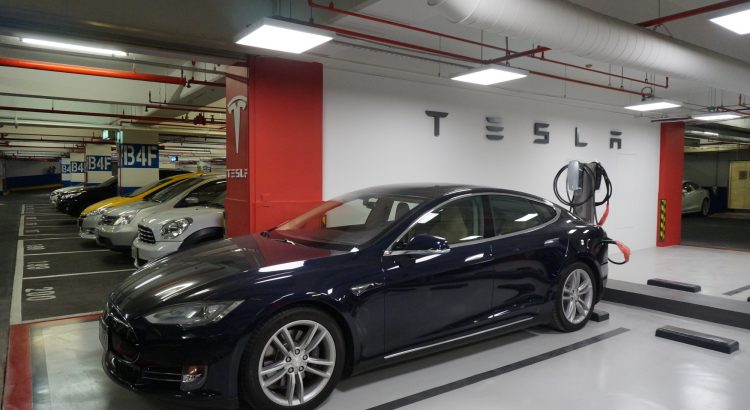
(首圖:設在新光三越信義A11 地下4 樓停車場的特斯拉目的地充電站,在2017 年特斯拉車子在臺灣道路奔馳之際,這類設在購物商場的充電站將會越來越多。來源:科技新報)

(本文授權轉載自《》──〈〉)

本站聲明:網站內容來源於EnergyTrend https://www.energytrend.com.tw/ev/,如有侵權,請聯繫我們,我們將及時處理

【其他文章推薦】

※超省錢租車方案

※別再煩惱如何寫文案,掌握八大原則!

※回頭車貨運收費標準

※教你寫出一流的銷售文案?

FB行銷專家,教你從零開始的技巧

聚甘新

cute-cnblogs 自定義博客園樣式美化二期來啦~

cute-cnblogs 自定義博客園樣式美化二期來啦~

說明

cute-cnblogs 可愛的博客園樣式美化、自定義博客園樣式 二期樣式已經編寫完畢了,如果說 一期樣式 給人的感覺是簡潔清爽的小嬰兒的話,那麼 二期樣式 就是一個有自己小個性(花樣)的小朋友了~

與一期一樣,需要文件的可以來 github ,喜歡我寫的樣式可以幫我點個 star 喔 ღゝ◡╹)ノ

(PS:有什麼問題也可以留言到 github issues 中喔~)

好了,讓我們擼起袖子開始更換二期樣式吧~

博客示例

ღゝ◡╹)ノ 麋鹿魯喲的博客園

介紹

可愛的博客園樣式美化、自定義博客園樣式 ღゝ◡╹)ノ

  • 本樣式以簡約可愛為核心,美化博客園的显示效果,增加自定義導航;
  • 基於博客園主題“Custom”進行的樣式修改;
  • 閱讀目錄導航;
  • 支持響應式;

功能

一期功能

  • 頂部背景點點動效隨鼠標而動
  • 導航欄自定義
  • 頁面詩意詩句模塊
  • 看板娘-貓(ฅ´ω`ฅ) (自行決定是否添加,因為這個有些影響加載速度)
  • 音樂-網易雲 (自行決定是否添加)
  • 上弔的貓(PS:回到頂部)(已用其餘按鈕代替此功能)
  • 底部跳動的魚<・)))><<
  • 點擊頁面跳動的小豆子及可愛的文字(自行決定是否添加可愛文字的點擊)
  • 評論增加OωO聊天表情
  • 頁面不同的導航背景及人物背景

二期增加功能

  • 側邊欄显示
  • 側邊欄公告欄及個人信息显示
  • 閱讀目錄(標題 h1 > h2 > h3 寫了三級目錄)
  • ️ 主題皮膚切換(淺白、暗黑、閱讀)
  • 仿主播點贊功能點擊推薦
  • ️ 讚賞模塊功能

模版選定

博客皮膚選定: 博客園 Custom 標準模板(與一期不同喔)

使用方法

基本操作

請按照順序進行操作喔~

  • 首先記得申請JS權限

  • 其次博客皮膚選擇 Custom

  • 在此需要獲取數據(不然點擊頭像的關注會失敗)
    找一個沒有登陸的瀏覽器訪問自己的博客園,F12彈出窗口,找到 +加關注,複製follow括號里的內容,暫且先存在一個地方

  • 勾選禁用模板默認CSS

  • 創建一個新隨筆(這裏使用選項中的TinyMCE(推薦)來編寫的) —— “友鏈”;(注意,此處已與一期不同)
  • 點擊 “編輯 HTML 源代碼” 插入以下代碼,修改自己的文本內容后,點擊更新;
  • 只勾選 高級選項中的 “發布”、“允許評論”;
<p style="text-align: center;">歡迎來到我的友鏈小屋</p>
<div class="friendsbox">
<div id="app">
<h6 style="text-align: center; color: #2daebf;">展示本站所有友情站點,排列不分先後,均勻打亂算法隨機渲染的喔!</h6>
<div class="unionbox-box" style="display: flex; flex-wrap: wrap; justify-content: space-between; margin-bottom: 1.5rem; margin-top: 1.5rem;">&nbsp;</div>
<hr style="position: relative; margin: 1rem 0; border: 1px dashed #9eabb3; width: calc(100%); height: 0;" />
<h2 style="text-align: center;">友鏈信息</h2>
<h5 style="text-align: left; line-height: 30px;">博客名稱:<a href="javascript:void(0)">麋鹿魯喲</a><br />博客網址:<a href="javascript:void(0)">https://www.cnblogs.com/miluluyo/</a><br />博客頭像:<a href="javascript:void(0)">https://pic.cnblogs.com/avatar/1273193/20190806180831.png</a><br />博客介紹:<a href="javascript:void(0)">大道至簡,知易行難。</a></h5>
<h2 style="text-align: center;">join us</h2>
<h5 style="text-align: center; color: #2daebf;">如需友鏈,請添加微信(s978761)告知,格式如下</h5>
<table class="table friendstable" style="margin: 0 auto;">
<tbody>
<tr><th><strong>字段</strong></th><th><strong>字義</strong></th></tr>

</tbody>

</table>

</div>

</div>

  • 最後分別複製以下區域代碼,並根據參數更改數據(PS:路徑可進行更改也可不更改,我覺得更改后速度會快一點,自行down文件上傳到博客園文件中,並更改引入路徑,文件都在 github 中,喜歡記得給我個star喔~)

頁面定製CSS代碼

複製 https://blog-static.cnblogs.com/files/miluluyo/cute-cnblogs2.css 的文件內容放到 頁面定製CSS代碼 區域

博客側邊欄公告

<link href="https://blog-static.cnblogs.com/files/miluluyo/tippy.min.css" rel="stylesheet">
<script src="https://blog-static.cnblogs.com/files/miluluyo/jquery2.min.js"></script>
<script src="https://blog-static.cnblogs.com/files/miluluyo/tippy.js"></script>
<script src="https://blog-static.cnblogs.com/files/miluluyo/milusidebar.js"></script>

<script>
milusidebar({
	'names' : '麋鹿魯喲',/*你的博客園名吶*/
	'notice' : '<b>溫馨提示</b><span><a href="https://github.com/miluluyo/cute-cnblogs" target="_black">cute-cnblogs</a> &nbsp;樣式已開源</span><b style="margin-top: 3px;"><a style="font-size:10px" href="https://www.cnblogs.com/IsAlpaca/" target="_black">查看一期樣式</a></b>',/*裏面文字自己可以更改喔*/
	'headerUrl' : 'https://images.cnblogs.com/cnblogs_com/miluluyo/1765646/o_200519075219notice5.png',/*這個是公告欄的背景圖啦,我覺得這個可愛,如果你有更好看的可以自行更改喔*/
	'follow' : 'a1e76459-101d-47af-a8b6-08d523685c8c', /*還記的開始讓你複製follow括號里的內容嗎,對,就放到這裏就好啦*/
	'sidebarInfo' : [[
	      {'icon':'#icon-github1','url':'https://github.com/miluluyo','title':'github'},
	      {'icon':'#icon-weixin','url':'','title':'微信','classname':'popper_weixin','click':false},
	      {'icon':'#icon-QQ','url':'http://wpa.qq.com/msgrd?v=3&uin=978761587&site=qq&menu=yes','title':'QQ'},
	      {'icon':'#icon-juejin','url':'https://juejin.im/user/5d18adce5188256e98090e33','title':'掘金'}
	  ],[
	      {'icon':'#icon-weibobangding','url':'https://www.weibo.com/6001406082/profile?topnav=1&wvr=6','title':'微博'},
	      {'icon':'#icon-csdn','url':'https://blog.csdn.net/qq_39394518','title':'CSDN'},
	      {'icon':'#icon-bilibili','url':'https://space.bilibili.com/100007925','title':'bilibili'},
	      {'icon':'#icon-yuquemianlogo','url':'https://www.yuque.com/miluluyo','title':'語雀'}
	]],/*這個模塊是個人信息內那些小圖標們,別忘記更改喔,具體參數,可以參考下面的表格喔*/
	'signature':'靡不有初  鮮克有終',/*來一句你自己喜歡的句子吧*/
	'popper_weixin':'<div class="popper_box"><p><b>很高興認識你鴨~  (づ。◕ᴗᴗ◕。)づ</b> </p><div class="popper_box_con"><div class="popper_box_con_li"><img src="https://images.cnblogs.com/cnblogs_com/miluluyo/1765646/o_200614064005qrcode.jpg" alt="">公眾號:麋鹿魯喲</div><div class="popper_box_con_li"><img src="https://images.cnblogs.com/cnblogs_com/miluluyo/1493340/t_wxh.jpg" alt="">微信號:s978761</div></div><p>(加我記得備註 博客園 喔)</div>',/*這裡是微信圖標的彈窗內容,可以自行更改內容喔*/
	'portrait':'https://images.cnblogs.com/cnblogs_com/miluluyo/1765646/o_200515061851tx.jpg'
})/*這個是頭像圖片喔,你可以上傳到相冊里,然後F12獲取,或者使用博客園的那個鏈接也可以的撒~*/
</script>

參數說明

名稱 類型 默認值/實例 描述
names 字符串 ‘麋鹿魯喲’ 博客園名稱
notice 字符串 ‘<b>溫馨提示</b><span><a href=”https://github.com/miluluyo/cute-cnblogs” target=”_black”>cute-cnblogs</a>  樣式已開源</span><b style=”margin-top: 3px;”><a style=”font-size:10px” href=”https://www.cnblogs.com/IsAlpaca/” target=”_black”>查看一期樣式</a></b>’ 公告內容
headerUrl 字符串 ‘https://images.cnblogs.com/cnblogs_com/miluluyo/1765646/o_200519075219notice5.png’ 公告欄的背景圖
follow 字符串 ‘a1e76459-101d-47af-a8b6-08d523685c8c’ 複製follow括號里的內容,這是關注的那個碼
sidebarInfo 數組 [[ {‘icon’:’#icon-github1′,’url’:’https://github.com/miluluyo’,’title’:’github’}, {‘icon’:’#icon-weixin’,’url’:”,’title’:’微信’,’classname’:’popper_weixin’,’click’:false}, {‘icon’:’#icon-QQ’,’url’:’http://wpa.qq.com/msgrd?v=3&uin=978761587&site=qq&menu=yes’,’title’:’QQ’}, {‘icon’:’#icon-juejin’,’url’:’https://juejin.im/user/5d18adce5188256e98090e33′,’title’:’掘金’} ],[ {‘icon’:’#icon-weibobangding’,’url’:’https://www.weibo.com/6001406082/profile?topnav=1&wvr=6′,’title’:’微博’}, {‘icon’:’#icon-csdn’,’url’:’https://blog.csdn.net/qq_39394518′,’title’:’CSDN’}, {‘icon’:’#icon-bilibili’,’url’:’https://space.bilibili.com/100007925′,’title’:’bilibili’}, {‘icon’:’#icon-yuquemianlogo’,’url’:’https://www.yuque.com/miluluyo’,’title’:’語雀’} ]] 個人信息內那些小圖標們
icon 圖標
url 跳轉鏈接
title 提示名字
classname 要添加的class名
click 是否允許點擊跳轉
本框架有擴展的icon,文件在 github 中的 icon 文件夾內,可以下載去查看
signature 字符串 ‘靡不有初 鮮克有終’ 個人信息簽名 (寫一句喜歡的話吧)
popper_weixin 字符串 ‘< div class=”popper_box”>< p>< b>很高興認識你鴨~ (づ。◕ᴗᴗ◕。)づ< /b> < /p>< div class=”popper_box_con”>< div class=”popper_box_con_li”>< img src=”https://images.cnblogs.com/cnblogs_com/miluluyo/1765646/o_200614064005qrcode.jpg” alt=””>公眾號:麋鹿魯喲< /div>< div class=”popper_box_con_li”>< img src=”https://images.cnblogs.com/cnblogs_com/miluluyo/1493340/t_wxh.jpg” alt=””>微信號:s978761< /div>< /div>< p>(加我記得備註 博客園 喔)< /div>’ 微信焦點彈窗,內容可自行更改,可以放一些公眾號啊啥的~
portrait 字符串 ‘https://images.cnblogs.com/cnblogs_com/miluluyo/1765646/o_200515061851tx.jpg’ 頭像圖片路徑

頁首Html代碼

  <div id="set_btn_box">
    <div class="set_btn fly_top fadeIn animated">
        <svg class="icon" aria-hidden="true"><use xlink:href="#icon-zhiding"></use></svg>
    </div>
    <div class="set_btn article_icon_btn catalogue_btn">
        <svg class="icon" aria-hidden="true" style="color:#97A1A7"><use xlink:href="#icon-dagang"></use></svg>
    </div>
    <div class="set_btn article_icon_btn comment">
        <a href="#comment_form_container"><svg class="icon" aria-hidden="true" style="color:#97A1A7"><use xlink:href="#icon-linedesign-01"></use></svg></a>
    </div>
    <div class="set_btn skin_btn">
        <svg class="icon" aria-hidden="true" style="color:#97A1A7"><use xlink:href="#icon-pifu"></use></svg>
    </div>
    <div class="set_btn gratuity">
        <svg class="icon" aria-hidden="true" style="color:#97A1A7"><use xlink:href="#icon-dashang"></use></svg>
    </div>
    <div class="set_btn article_icon_btn artice_recommend">
        <svg class="icon" aria-hidden="true" style="color:#97A1A7"><use xlink:href="#icon-tuijian2"></use></svg>
    </div>
     <canvas id="thumsCanvas" width="200" height="400" style="width:100px;height:200px"></canvas>
    <div class="set_btn catalogue">
        <svg class="icon" aria-hidden="true" style="color:#97A1A7"><use xlink:href="#icon-cebianlan-"></use></svg>
    </div>
</div>
<script src='https://blog-static.cnblogs.com/files/miluluyo/canvas2.js'></script>
<!--
<link href="//files.cnblogs.com/files/linianhui/lnh.cnblogs.css" rel="stylesheet"/>-->

頁腳Html代碼

  <style id="ceshicss">
@media (max-width: 767px){
#set_btn_box {width: 100vw;left: 0;right: 0;bottom: 0;background: hsla(0,0%,100%,.6);height: 49px;display: flex;justify-content: space-between;align-items: center;padding: 12px 40px;border-top: 1px solid #e8e8e8;box-sizing: border-box;}
.set_btn {margin-top: 0;}
.set_btn.fly_top.fadeIn.animated {position: absolute;right: 10px;bottom: 60px;}
.container{bottom:50px}}
#mainContent{width:90%}
</style>
<link href="https://blog-static.cnblogs.com/files/miluluyo/tippy.min.css" rel="stylesheet">
<script src="https://unpkg.com/@popperjs/core@2.4.2/dist/umd/popper.min.js"></script>
<script src="https://blog-static.cnblogs.com/files/miluluyo/tippy.js"></script>
<link rel='stylesheet' href='https://cdn.bootcss.com/animate.css/3.7.2/animate.min.css'>
<script src="https://at.alicdn.com/t/font_1825850_klax1ao4o6.js"></script>
<script src="https://blog-static.cnblogs.com/files/miluluyo/three.min.js"></script>
<script src='https://blog-static.cnblogs.com/files/miluluyo/star.js'></script>
<link rel="stylesheet" href="https://blog-static.cnblogs.com/files/miluluyo/OwO.min.css" />
<script src="https://blog-static.cnblogs.com/files/miluluyo/OwO2.min.js"></script>
<script src="https://blog-static.cnblogs.com/files/miluluyo/cute-cnblogs2.js"></script>
<script src="https://blog-static.cnblogs.com/files/miluluyo/monitoring2.js"></script>

<script>

miluframe({
  Youself:'https://www.cnblogs.com/miluluyo/', /*個人的博客園鏈接*/
  /*博客園導航信息*/
    custom:[{
      name:'首頁',
      link:'https://www.cnblogs.com/miluluyo/',
      istarget:false
    },{
      name:'聯繫',
      link:'https://msg.cnblogs.com/send/%E9%BA%8B%E9%B9%BF%E9%B2%81%E5%93%9F',
      istarget:true
    },{
      name:'技能樹',
      link:'https://miluluyo.github.io/',
      istarget:true
    },{
      name:'留言板',
      link:'https://www.cnblogs.com/miluluyo/p/11578505.html',
      istarget:false
    },{
      name:'相冊',
      link:'https://www.cnblogs.com/miluluyo/gallery.html',
      istarget:false
    },{
      name:'友鏈',
      link:'https://www.cnblogs.com/miluluyo/p/11633791.html',
      istarget:false
    },{
      name:'維護',
      link:'https://www.cnblogs.com/miluluyo/p/12092009.html',
      istarget:false
    },{
      name:'投喂',
      link:'https://www.cnblogs.com/miluluyo/p/gratuity.html',
      istarget:false
    },{
      name:'管理',
      link:'https://i.cnblogs.com/',
      istarget:true
    }],
    /*向別人展示自己的友鏈信息*/
    resume:{
        "name":"麋鹿魯喲",
        "link":"https://www.cnblogs.com/miluluyo/",
        "headurl":"https://images.cnblogs.com/cnblogs_com/elkyo/1558759/o_o_my.jpg",
        "introduction":"大道至簡,知易行難。"
    },
    /*友鏈信息*/
    unionbox:[{
        "name":"麋鹿魯喲",
        "introduction":"生活是沒有標準答案的。",
        "url":"https://www.cnblogs.com/miluluyo",
        "headurl":"https://images.cnblogs.com/cnblogs_com/elkyo/1558759/o_o_my.jpg"
      },{
        "name":"麋鹿魯喲的技能樹",
        "introduction":"大道至簡,知易行難。",
        "url":"https://miluluyo.github.io/",
        "headurl":"https://images.cnblogs.com/cnblogs_com/elkyo/1558759/o_o_my.jpg"
      }],
    /*友鏈表格頭信息,這個可以忽略*/
    details:[{
        field: 'name',
        literal: '昵稱',
      },{
        field: 'introduction',
        literal: '標語',
      },{
        field: 'url',
        literal: '鏈接地址',
      },{
        field: 'headurl',
        literal: '頭像地址',
      }],
    /*瀏覽器頂部小圖標*/
    logoimg:'https://images.cnblogs.com/cnblogs_com/miluluyo/1765646/o_200519070633f12.png',
    /*文章頁面標題前的圖標,此處圖標有擴展,下面會提到圖標*/
    cuteicon:['icon-caomei','icon-boluo','icon-huolongguo','icon-chengzi','icon-hamigua','icon-lizhi','icon-mangguo','icon-liulian','icon-lizi','icon-lanmei','icon-longyan','icon-shanzhu','icon-pingguo','icon-mihoutao','icon-niuyouguo','icon-xigua','icon-putao','icon-xiangjiao','icon-ningmeng','icon-yingtao','icon-taozi','icon-shiliu','icon-ximei','icon-shizi'],
    /*讚賞,若true則显示此按鈕,false則不显示*/
    isGratuity:true,
    /*讚賞按鈕焦點显示讚賞內容,內容可自行更改*/
    gratuity:'<div class="popper_box"><p><b>要請我喝奶茶嗎  (づ。◕ᴗᴗ◕。)づ</b> </p><div class="popper_box_con"><div class="popper_box_con_li"><img src="https://images.cnblogs.com/cnblogs_com/miluluyo/1765646/o_200521053817wx.png" alt="">微信掃碼</div><div class="popper_box_con_li"><img src="https://images.cnblogs.com/cnblogs_com/miluluyo/1765646/o_200521053827zfb.png" >支付寶掃碼</div></div><p><b>留下一句你覺得很勵志與美的話給我吧~</b>&nbsp;&nbsp;<b><a href="https://www.cnblogs.com/miluluyo/p/12930946.html">GO</a></b></div>'
})
</script>
<!-- 點贊 -->
<canvas width="1777" height="841" style="position: fixed; left: 0px; top: 0px; z-index: 2147483647; pointer-events: none;"></canvas><script src="https://blog-static.cnblogs.com/files/miluluyo/mouse-click.js"></script>

<!-- 以下內容是否添加你隨意 -->

<script>
  /*在文章頁面添加古詩詞*/
  $("#navigator").after('<div class="poem-wrap"><div class="poem-border poem-left"></div><div class="poem-border poem-right"></div><h1>念兩句詩</h1><div id="poem_sentence"></div><div id="poem_info"></div></div>')
</script>
<script src="https://sdk.jinrishici.com/v2/browser/jinrishici.js" charset="utf-8"></script>
<script type="text/javascript">
  jinrishici.load(function(result) {
    var sentence = document.querySelector("#poem_sentence")
    var info = document.querySelector("#poem_info")
    sentence.innerHTML = result.data.content
    info.innerHTML = '【' + result.data.origin.dynasty + '】' + result.data.origin.author + '《' + result.data.origin.title + '》'
  });
</script>

<script type="text/javascript">
/* 鼠標特效,我覺得太花哨了就註釋了,喜歡的自己打開註釋就可以 */
/*var a_idx = 0;
jQuery(document).ready(function($) {
    $("body").click(function(e) {
        var a = new Array("去活出你自己。","今天的好計劃勝過明天的完美計劃。","不要輕言放棄,否則對不起自己。","緊要關頭不放棄,絕望就會變成希望。","如果不能改變結果,那就完善過程。","好好活就是干有意義的事,有意義的事就是好好活!","你真正是誰並不重要,重要的是你的所做所為。","你不想為你的信仰冒一下險嗎?難道想等你老了,再後悔莫及嗎?","有些鳥兒是關不住的,它的每一根羽毛都閃耀着自由的光輝。","決定我們成為什麼樣人的,不是我們的能力,而是我們的選擇。","掉在水裡你不會淹死,呆在水裡你才會淹死,你只有游,不停的往前游。","有些路,只能一個人走。","希望你眼眸有星辰,心中有山海。","從此以夢為馬,不負韶華。","人的成就和差異決定於其業餘時間。","佛不要你皈依,佛要你歡喜。","ダーリンのこと 大好きだよ","小貓在午睡時,地球在轉。","我,混世大魔王,申請做你的小熊軟糖。","決定好啦,要暗暗努力。","吶,做人呢最緊要開心。","好想邀請你一起去雲朵上打呼嚕呀。","永遠年輕,永遠熱淚盈眶。","我生來平庸,也生來驕傲。","我走得很慢,但我從不後退。","人間不正經生活手冊。","我是可愛的小姑娘,你是可愛。","數學里,有個溫柔霸道的詞,有且僅有。","吧唧一口,吃掉難過。","你頭髮亂了哦。","健康可愛,沒有眼袋。","日月星辰之外,你是第四種難得。","你是否成為了了不起的成年人?","大家都是第一次做人。","何事喧嘩?!","人間有味是清歡。","你笑起來真像好天氣。","風填詞半句,雪斟酒一壺。","除了自渡,他人愛莫能助。","昨日種種,皆成今我。","一夢入混沌 明月撞星辰","保持獨立 適當擁有","謝謝你出現 這一生我很喜歡","做自己就好了 我會喜歡你的","太嚴肅的話,是沒辦法在人間尋歡作樂的","願你餘生可隨遇而安,步步慢。","黃瓜在於拍,人生在於嗨","奇變偶不變,符號看象限。","從來如此,便對么?","今天我這兒的太陽,正好適合曬鈣 你呢","未來可期,萬事勝意。","星光不問趕路人 時光不負有心人","我當然不會試圖摘月,我要月亮奔我而來","女生要修鍊成的五樣東西: 揚在臉上的自信,長在心底的善良, 融進血里的骨氣,刻進命里的堅強,深到骨子里的教養","燕去燕歸,滄海桑田。縱此生不見,平安惟願","我想認識你 趁風不注意","我一直想從你的窗子里看月亮","長大應該是變溫柔,對全世界都溫柔。","別在深夜做任何決定","山中何事,松花釀酒,春水煎茶。","桃李春風一杯酒,江湖夜雨十年燈。","欲買桂花同載酒,終不似,少年游。");
        var le = Math.ceil(Math.random()*a.length); 
        var $i = $("<span></span>").text(a[le]);/*a[a_idx]*/
        /*a_idx = (a_idx + 1) % a.length;
        var x = e.pageX,
        y = e.pageY;
        $i.css({
            "z-index": 999999999999999999999999999999999999999999999999999999999999999999999,
            "top": y - 20,
            "left": x,
            "position": "absolute",
            "font-weight": "bold",
            "color": "rgb("+~~(255*Math.random())+","+~~(255*Math.random())+","+~~(255*Math.random())+")"
        });
        $("body").append($i);
        $i.animate({
            "top": y - 180,
            "opacity": 0
        },
        2000,
        function() {
            $i.remove();
        });
    });
});*/
</script>


<!--音樂,只在PC端寬度>1000px時显示-->
<link rel="stylesheet" href="https://blog-static.cnblogs.com/files/miluluyo/APlayer.min.css">
<div id="player" class="aplayer aplayer-withlist aplayer-fixed" data-id="3116636104" data-server="netease" data-type="playlist" data-order="random" data-fixed="true" data-listfolded="true" data-theme="#2D8CF0"></div>
<script src="https://blog-static.cnblogs.com/files/miluluyo/APlayer.min.js"></script>
<script src="https://blog-static.cnblogs.com/files/miluluyo/Meting.min.js"></script>

<!--貓,只在PC端显示,移動端不加載了,因為會卡頓頁面-->
<script src="https://eqcn.ajz.miesnfu.com/wp-content/plugins/wp-3d-pony/live2dw/lib/L2Dwidget.min.js"></script>
<script>
  var mobile_flag = isMobile();
  if(mobile_flag){
    //console.info("移動端")
  }else{
    //console.info("PC端")
    L2Dwidget.init({
        "model": {
            "jsonPath": "https://unpkg.com/live2d-widget-model-hijiki/assets/hijiki.model.json",
            "scale": 1
        },
        "display": {
            "position": "left",
            "width": 100,
            "height": 200,
            "hOffset": 70,
            "vOffset": 0
        },
        "mobile": {
            "show": true,
            "scale": 0.5
        },
        "react": {
            "opacityDefault": 0.7,
            "opacityOnHover": 0.2
        }
    });
    window.onload = function(){
      $("#live2dcanvas").attr("style","position: fixed; opacity: 0.7; left: 70px; bottom: 0px; z-index: 1; pointer-events: none;")
    }
  }

</script>

<script>

/*記錄訪問數據,我用了兩個,一個是這個在 https://clustrmaps.com/ 網站,另一個是 https://www.51.la/ 這個網站*/
/*
	第一種:https://clustrmaps.com/
	註冊賬號,添加自己博客園的鏈接,選擇自定義Customize,
	選擇 Image based (basic version for websites that don't support javascript),調整到你喜歡的樣式,然後複製
	:這個我插入在了側邊欄的最底部,把生成的代碼粘貼到append內,這就完事了
*/
$('#sideBarMain').append('')

/*
	第二種:https://www.51.la/
	註冊賬號,點控制台,添加統計ID,統計圖標显示我是不显示的
	這個目前插入的js好像報錯,我的是很早之前生成的,還能用,因此還是推薦用第一種吧

	別的地方也有這種很多統計訪問數據的,可以自己找找看呢

*/
</script>

參數說明

名稱 類型 默認值/實例 描述
Youself 字符串 https://www.cnblogs.com/miluluyo/ 個人博客園首鏈接
custom 數組 [{ name:’首頁’, link:’https://www.cnblogs.com/miluluyo/’, istarget:false },{ name:’聯繫’, link:’https://msg.cnblogs.com/send/%E9%BA%8B%E9%B9%BF%E9%B2%81%E5%93%9F’, istarget:true },{ name:’技能樹’, link:’https://miluluyo.github.io/’, istarget:true },{ name:’留言板’, link:’https://www.cnblogs.com/miluluyo/p/11578505.html’, istarget:false },{ name:’相冊’, link:’https://www.cnblogs.com/miluluyo/gallery.html’, istarget:false },{ name:’友鏈’, link:’https://www.cnblogs.com/miluluyo/p/11633791.html’, istarget:false },{ name:’維護’, link:’https://www.cnblogs.com/miluluyo/p/12092009.html’, istarget:false },{ name:’投喂’, link:’https://www.cnblogs.com/miluluyo/p/gratuity.html’, istarget:false },{ name:’管理’, link:’https://i.cnblogs.com/’, istarget:true }] 導航信息
name 導航名
link 導航鏈接
istarget true跳轉到新頁面上,false當前頁面打開
resume 對象 {
“name”:”麋鹿魯喲”,
“link”:”https://www.cnblogs.com/miluluyo/”,
“headurl”:”https://images.cnblogs.com/cnblogs_com/
elkyo/1558759/o_o_my.jpg”,
“introduction”:”大道至簡,知易行難。”
}
自己的友鏈信息
name 導航名
link 導航鏈接
headurl 頭像
introduction 語錄
unionbox 數組 [{
“name”:”麋鹿魯喲”,
“introduction”:”生活是沒有標準答案的。”,
“url”:”https://www.cnblogs.com/miluluyo”,
“headurl”:”https://images.cnblogs.com/cnblogs_com/
elkyo/1558759/o_o_my.jpg”
},{
“name”:”麋鹿魯喲的技能樹”,
“introduction”:”大道至簡,知易行難。”,
“url”:”https://miluluyo.github.io/”,
“headurl”:”https://images.cnblogs.com/cnblogs_com/
elkyo/1558759/o_o_my.jpg”
}]
友鏈數組
name 昵稱
introduction 標語
url 鏈接地址
headurl 頭像地址
clicktext 數組 [{ field: ‘name’, literal: ‘昵稱’, },{ field: ‘introduction’, literal: ‘標語’, },{ field: ‘url’, literal: ‘鏈接地址’, },{ field: ‘headurl’, literal: ‘頭像地址’, }] 友鏈表格頭信息,這項可以忽略掉
logoimg 字符串 ‘https://images.cnblogs.com/cnblogs_com/miluluyo/1765646/o_200519070633f12.png’ 瀏覽器頂部小圖標
cuteicon 數組 [‘icon-caomei’,’icon-boluo’,’icon-huolongguo’,’icon-chengzi’,’icon-hamigua’,’icon-lizhi’,’icon-mangguo’,’icon-liulian’,’icon-lizi’,’icon-lanmei’,’icon-longyan’,’icon-shanzhu’,’icon-pingguo’,’icon-mihoutao’,’icon-niuyouguo’,’icon-xigua’,’icon-putao’,’icon-xiangjiao’,’icon-ningmeng’,’icon-yingtao’,’icon-taozi’,’icon-shiliu’,’icon-ximei’,’icon-shizi’] 文章頁面標題前的圖標,此處圖標我只放入了一些水果的icon,不過可以自己引入文件進行修改名字添加自己想加的,本框架有擴展的icon,文件在 github 中的 icon 文件夾內,可以下載去查看
gratuity 字符串 ‘<div class=”popper_box”><p><b>要請我喝奶茶嗎 (づ。◕ᴗᴗ◕。)づ</b> </p><div class=”popper_box_con”><div class=”popper_box_con_li”><img src=”https://images.cnblogs.com/cnblogs_com/miluluyo/1765646/o_200521053817wx.png” alt=””>微信掃碼</div><div class=”popper_box_con_li”><img src=”https://images.cnblogs.com/cnblogs_com/miluluyo/1765646/o_200521053827zfb.png” >支付寶掃碼</div></div><p><b>留下一句你覺得很勵志與美的話給我吧~</b>  <b><a href=”https://www.cnblogs.com/miluluyo/p/12930946.html”>GO</a></b></div>’ 讚賞按鈕焦點显示讚賞內容,內容可自行更改
isGratuity 布爾值 true 默認true,若true則显示此按鈕,false則不显示

更換頂部背景圖

當前框架使用了一張圖片,也可以自己進行更換成隨機圖片API

在css樣式中

 #blogTitle{background:url(https://images.cnblogs.com/cnblogs_com/miluluyo/1764887/o_20051406472117.jpg) center center / cover no-repeat #222;overflow:hidden;width:100%;height:40vh;max-height:40vh;box-shadow:0 1px 2px rgba(150,150,150,.7);       /*搜索這個 更換 background: url() 里的鏈接 即可*/

最後

更多內容請查看 cute-cnblogs 自定義番外篇
(PS:可以使用番外篇里的隨機圖片API喔~)

請吃糖

如果您喜歡這裏,感覺對你有幫助,並且有多餘的軟妹幣的話,不妨投喂一顆糖喔~

<(▰˘◡˘▰)> 謝謝老闆~

微信掃碼

支付寶掃碼

讚賞的時候,留下一句你覺得很勵志與美的話給我吧~

(也可以加一個博客園給我喔,會添加在名字的旁邊喔~點擊可以跳轉~ 例如:去瞧瞧都有誰讚賞了

為了響應大家的號召,方便大家技術交流,之前建立了一個微信群,如果大家有需要可以掃碼(或者搜我微信號:s978761)加我好友,我邀請你加入~本群是一個純交流學習工作的群,不準發布廣告、營銷相關的信息!對了,加我記得備註上:博客園+名稱 加群 喔~

微信號:s978761

公眾號:麋鹿魯喲

本站聲明:網站內容來源於博客園,如有侵權,請聯繫我們,我們將及時處理

【其他文章推薦】

※為什麼 USB CONNECTOR 是電子產業重要的元件?

網頁設計一頭霧水該從何著手呢? 台北網頁設計公司幫您輕鬆架站!

※台北網頁設計公司全省服務真心推薦

※想知道最厲害的網頁設計公司“嚨底家”!

※推薦評價好的iphone維修中心

聚甘新

布局之: flex(CSS3新增)

flex 基本概念

  flex布局(flex是flexible box的縮寫), 也稱為彈性盒模型 。將屬性和屬性值(display:flex; )寫在哪個標籤樣式中,誰就是 容器;它的所有子元素自動成為容器成員,稱為項目。

當一個元素的display 取值為flex,所有項目(子元素)會在一行显示;如果所有項目的尺寸之和大於容器,也不會超出父元素的寬、高度。不會換行(每個項目都會自動縮小相應的比例)。

<!DOCTYPE html>
<html lang="en">
<head>
    <meta charset="UTF-8">
    <meta name="viewport" content="width=device-width, initial-scale=1.0">
    <title>布局之:flex</title>
    <link rel="stylesheet" href="./CSS/normalize.css">
    <style>
        section {
            width: 500px;
            height: 800px;
            border: 2px solid black;
            margin: 50px auto;
            display: flex;
        }
        div {
            width: 100px;
            height: 100px;
            border: 1px solid tomato;
        }
    </style>
</head>
<body>
    <section>
        <div>01</div>
        <div>02</div>
        <div>03</div>
        <div>04</div>
        <div>05</div>
        <div>06</div>
    </section>
</body>
</html>

頁面效果 : 每一個項目都等比例縮小了。


  css代碼分為兩種: 一類是適用於容器的 (設置主軸的起始位置、換行、主軸的對齊方式、多跟軸線對齊方式);一類是適用於項目的(設置項目的位置)。

容器常用的屬性和屬性值

由於重複代碼較多,就不一 一上傳代碼了,大家可以自己動手,敲敲代碼,試試看。

一、設置主軸的起始方向  flex-direction:

默認為X軸(行):

<style>
        section {
            width: 500px;
            height: 500px;
            border: 2px solid black;
            margin: 50px auto;
            display: flex;
            /* flex-direction: row; */
            /* flex-direction: row-reverse; */
            /* flex-direction: column; */
            /* flex-direction: column-reverse; */
        }
        
        div {
            width: 100px;
            height: 100px;
            border: 1px solid tomato;
        }
    </style>


flex-direction:row; 默認是X軸的起始方向為開始位置 (從左到右依次擺放);
flex-direction:row-reverse; 改變X軸的起始方向為結束位置 (從右到左依次擺放);

設置主軸的起始方向為Y軸(列):

flex-direction:column; 默認是Y軸的起始方向為開始位置(從上到下依次擺放)
flex-direction:column-reverse; 改變Y軸的起始方向為結束位置(從下到上依次擺放)

二、設置項目是否換行  flex-wrap:(默認是不換行)

 <style>
        section {
            width: 400px;
            height: 400px;
            border: 2px solid black;
            margin: 50px auto;
            display: flex;
            /* flex-wrap: wrap; */
            /* flex-wrap: wrap-reverse; */
        }
        
        div {
            width: 100px;
            height: 100px;
            border: 1px solid tomato;
        }
    </style>

flex-wrap: nowrap;  默認值是不換行;(n個項目都會在一行显示.如果項目尺寸之和大於容器主軸的尺寸,則項目會自動縮小相應比列.) (參考第一個代碼 頁面結果展示)

flex-wrap: wrap; 設置換行;(超出主軸的寬,則進行換行。換行后,兩行之間會出現間距,是因為垂直方向有剩餘空間,會平均分配給第二行的上下)

flex-wrap: wrap-reverse; 倒序換行;(如果有兩行,第2行显示在前面,第一行显示在後面)

三、主軸方向的對齊方式  justify-content:

項目是一個時:

 <style>
        section {
            width: 400px;
            height: 400px;
            border: 2px solid black;
            margin: 50px auto;
            display: flex;
            /* justify-content: flex-start; */
            /* justify-content: flex-end; */
            /* justify-content: center; */
        }
        
        div {
            width: 100px;
            height: 100px;
            border: 1px solid tomato;
        }
    </style>

justify-content:flex-start; 以主軸開始方向對齊 (默認)
justify-content:flex-end; 以主軸結束方向對齊

justify-content:center; 主軸方向居中

項目是多個時:

<style>
        section {
            width: 500px;
            height: 500px;
            border: 2px solid black;
            margin: 50px auto;
            display: flex;
            /* justify-content: space-between; */
            /* justify-content: space-around; */
            /* justify-content: space-evenly; */
        }
        
        div {
            width: 100px;
            height: 100px;
            border: 1px solid tomato;
        }
    </style>

justify-content: space-between; 兩端對齊 (第一個項目在容器的起始位置,最後一個項目在容器的結束位置,中間距離相等)


justify-content: space-around;  分散對齊

justify-content: space-evenly;  平分剩餘空間,每個項目之間的距離相同


四、主軸改變為交叉軸方向的對齊方式

一根軸線:  主軸需改變為Y軸:flex-direction: column;


align-items: baseline; 以項目的第一行文字的基線對齊

align-items: stretch; (項目沒有給高的情況下,stretch就是默認值,如果項目沒有設置高度,就是容器的高)


 <style>
        section {
width: 500px; height: 500px; border: 2px solid black; margin: 50px auto; display: flex; /* 主軸需改變為Y軸 項目按列擺放 */ flex-direction: column; /* align-items: flex-start; 默認擺放方式 */ /* align-items: center; */ /* align-items: flex-end; */

} div { width: 100px; height: 100px; border: 1px solid tomato; } </style>


align-items: flex-start;  交叉軸從開始位置對齊
align-items: center; 交叉軸居中對齊

align-items: flex-end; 交叉軸從結束位置對齊

多根軸線: (所有項目的尺寸之和,必須大於容器的尺寸,使項目換行显示)

<style>
        section {
            width: 500px;
            height: 500px;
            border: 2px solid black;
            margin: 50px auto;
            display: flex;
            flex-direction: column;
            flex-wrap: wrap;
            /* align-content: center; */
            /* align-content: flex-end; */
            /* align-content: space-between; */
            /* align-content: space-around; */
        }
        
        div {
            width: 100px;
            height: 100px;
            border: 1px solid tomato;
        }
    </style>


align-content: flex-start; 交叉軸從開始位置對齊
align-content: center; 交叉軸居中對齊

align-content: flex-end; 交叉軸從結束位置對齊

align-content: space-between; 交叉軸兩端對齊

align-content: space-around; 交叉軸分散對齊

align-content: space-evenly; 交叉軸平均分配


項目的屬性和屬性值:

一、order 控制項目位置

order:1;
取值 : 正、負數 (默認值是 0)
值越小越靠前 值越大越靠後 。

(適用場景: 1.搜索引擎優化,提升SEO 把重要的信息在html代碼中靠前擺放,但不影響布局 2.調整項目位置)

<style>
        section {
            width: 500px;
            height: 500px;
            border: 2px solid black;
            margin: 50px auto;
            display: flex;
        }
        
        div {
            width: 100px;
            height: 100px;
            border: 1px solid tomato;
        }
        
        div:nth-child(4) {
            order: -1;
        }
    </style>

設置一個或多個[項目]在交叉軸的對齊方式:

 <style>
        section {
            width: 800px;
            height: 400px;
            border: 2px solid black;
            margin: 50px auto;
            display: flex;
        }
        
        div {
            width: 100px;
            height: 100px;
            border: 1px solid tomato;
        }
        
        div:nth-child(2) {
            align-self: center;
        }
        
        div:nth-child(3) {
            align-self: flex-end;
        }
    </style>

align-self: flex-start; 設置項目在交叉軸開始位置擺放 (默認位置)
align-self: center; 設置項目在交叉軸居中擺放

align-self: flex-end; 設置項目在交叉軸結束位置擺放

設置某一個或多個元素放大比例

  條件:所有項目的尺寸之和要小於容器的尺寸
  (沒有剩餘空間,則設置此屬性無效。)

一個元素有 flex-grow 屬性

<style>
        section {
            width: 800px;
            height: 400px;
            border: 2px solid black;
            margin: 50px auto;
            display: flex;
        }
        
        div {
            width: 100px;
            height: 100px;
            border: 1px solid tomato;
        }
        
        div:nth-child(2) {
            flex-grow: 1;
        }
    </style>

多個項目有flex-grow 屬性

<style>
        section {
            width: 800px;
            height: 200px;
            border: 2px solid black;
            margin: 50px auto;
            display: flex;
            box-sizing: border-box;
        }
        
        div {
            width: 100px;
            height: 100px;
            border: 1px solid tomato;
            box-sizing: border-box;
        }
        
        div:nth-child(2) {
            flex-grow: 1;
        }
        
        div:nth-child(4) {
            flex-grow: 2;
        }
    </style>

效果展示

將容器的剩餘空間分成相應的flex-grow的份數,再按照每個項目的份數,分給有flex-grow屬性的項目。


  總之,flex使用起來特別方便,可適用於響應式布局,也可使用聖杯布局。只是屬性較多,也要多練、多實踐 ,相信你也能很快熟練使用flex的。

推薦一個小遊戲,很有趣,又能增強關於flex的使用方法 :Flexbox Froggy  http://blog.xiaoboswift.com/flexbox/#zh-cn  去幫助小青蛙回家吧~~


本站聲明:網站內容來源於博客園,如有侵權,請聯繫我們,我們將及時處理【其他文章推薦】

網頁設計一頭霧水該從何著手呢? 台北網頁設計公司幫您輕鬆架站!

網頁設計公司推薦不同的風格,搶佔消費者視覺第一線

※想知道購買電動車哪裡補助最多?台中電動車補助資訊懶人包彙整

南投搬家公司費用,距離,噸數怎麼算?達人教你簡易估價知識!

※教你寫出一流的銷售文案?

※超省錢租車方案

聚甘新

.Net Core服務監控報警指標上報Prometheus+Grafana

前言

簡單集成Prometheus+Grafana,指標的上報收集可視化。

Prometheus

Prometheus是一個監控平台,監控從HTTP端口收集受監控目標的指標。在微服務的架構里Prometheus多維度的數據收集是非常強大的 我們首先下載安裝Prometheusnode_exporter,node_exporter用於監控CPU、內存、磁盤、I/O等信息

  • Prometheus下載地址
  • node_exporter下載地址

下載完成后解壓以管理員運行 prometheus.exe 訪問 http://localhost:9090/ 出現一下頁面說明啟動成功啦

.Net Core獲取指標

有了Prometheus,我們還需要給Prometheus提供獲取監控數據的接口,我們新建一個WebApi項目,並導入prometheus-net.AspNetCore包,在Configure中加入UseMetricServer中間件

public void Configure(IApplicationBuilder app, IWebHostEnvironment env)
{

    app.UseMetricServer();
    
}

啟動項目訪問http://localhost:5000/metrics就可以看基本的一些監控信息啦,包括線程數,句柄數,3個GC的回收計數等信息。

# HELP process_num_threads Total number of threads
# TYPE process_num_threads gauge
process_num_threads 29
# HELP process_working_set_bytes Process working set
# TYPE process_working_set_bytes gauge
process_working_set_bytes 44441600
# HELP process_private_memory_bytes Process private memory size
# TYPE process_private_memory_bytes gauge
process_private_memory_bytes 69660672
# HELP dotnet_total_memory_bytes Total known allocated memory
# TYPE dotnet_total_memory_bytes gauge
dotnet_total_memory_bytes 2464584
# HELP dotnet_collection_count_total GC collection count
# TYPE dotnet_collection_count_total counter
dotnet_collection_count_total{generation="1"} 0
dotnet_collection_count_total{generation="0"} 0
dotnet_collection_count_total{generation="2"} 0
# HELP process_start_time_seconds Start time of the process since unix epoch in seconds.
# TYPE process_start_time_seconds gauge
process_start_time_seconds 1592448124.2853072
# HELP process_open_handles Number of open handles
# TYPE process_open_handles gauge
process_open_handles 413
# HELP process_virtual_memory_bytes Virtual memory size in bytes.
# TYPE process_virtual_memory_bytes gauge
process_virtual_memory_bytes 2225187631104
# HELP process_cpu_seconds_total Total user and system CPU time spent in seconds.
# TYPE process_cpu_seconds_total counter
process_cpu_seconds_total 1.171875

Help 是收集指標的說明,Type收集指標的類型

但是作為HTTP應用怎麼能沒有HTTP的監控和計數呢,只需要加加入UseHttpMetrics中間件就可以對HTTP請求監控和計數,主要注意的是UseHttpMetrics最好放在UseEndpointsUseRouting中間

public void Configure(IApplicationBuilder app, IWebHostEnvironment env)
{
    app.UseMetricServer();
    
    app.UseRouting();
    
    app.UseHttpMetrics();

    app.UseEndpoints(endpoints => { endpoints.MapControllers(); });
}

啟動項目繼續訪問http://localhost:5000/metrics

# HELP http_requests_in_progress The number of requests currently in progress in the ASP.NET Core pipeline. One series without controller/action label values counts all in-progress requests, with separate series existing for each controller-action pair.
# TYPE http_requests_in_progress gauge

可以看到已經有了,我們隨便請求一下服務看看效果,會幫我們記錄下總耗時,總請求數,和每次請求的耗時數

但是單單有上面那些數據好像還不太好定位一下很奇葩的問題,這時候我們可以獲取Runtime的一些數據,方法童謠很簡單。導入prometheus-net.DotNetRuntime 包,它可以幫助我們看到如下指標

  • 垃圾回收的收集頻率和時間
  • 服務佔用堆大小
  • 對象堆分配的字節
  • JIT編譯和JIT CPU消耗率
  • 線程池大小,調度延遲以及增長/縮小的原因
  • 鎖爭用情況

我們只需要在ProgramMain方法中啟動收集器就可以啦。

public static void Main(string[] args)
{
    DotNetRuntimeStatsBuilder.Default().StartCollecting();
    CreateHostBuilder(args).Build().Run();
}

啟動項目繼續訪問http://localhost:5000/metrics測試一下

# HELP dotnet_collection_count_total GC collection count
# TYPE dotnet_collection_count_total counter
dotnet_collection_count_total{generation="1"} 0
dotnet_collection_count_total{generation="0"} 0
dotnet_collection_count_total{generation="2"} 0
# HELP process_private_memory_bytes Process private memory size
# TYPE process_private_memory_bytes gauge
process_private_memory_bytes 75141120
# HELP dotnet_gc_pause_ratio The percentage of time the process spent paused for garbage collection
# TYPE dotnet_gc_pause_ratio gauge
dotnet_gc_pause_ratio 0
# HELP http_requests_received_total Provides the count of HTTP requests that have been processed by the ASP.NET Core pipeline.
# TYPE http_requests_received_total counter
# HELP dotnet_gc_collection_seconds The amount of time spent running garbage collections
# TYPE dotnet_gc_collection_seconds histogram
dotnet_gc_collection_seconds_sum 0
dotnet_gc_collection_seconds_count 0
dotnet_gc_collection_seconds_bucket{le="0.001"} 0
dotnet_gc_collection_seconds_bucket{le="0.01"} 0
dotnet_gc_collection_seconds_bucket{le="0.05"} 0
dotnet_gc_collection_seconds_bucket{le="0.1"} 0
dotnet_gc_collection_seconds_bucket{le="0.5"} 0
dotnet_gc_collection_seconds_bucket{le="1"} 0
dotnet_gc_collection_seconds_bucket{le="10"} 0
dotnet_gc_collection_seconds_bucket{le="+Inf"} 0
# HELP dotnet_total_memory_bytes Total known allocated memory
# TYPE dotnet_total_memory_bytes gauge
dotnet_total_memory_bytes 4925936
# HELP dotnet_threadpool_num_threads The number of active threads in the thread pool
# TYPE dotnet_threadpool_num_threads gauge
dotnet_threadpool_num_threads 0
# HELP dotnet_threadpool_scheduling_delay_seconds A breakdown of the latency experienced between an item being scheduled for execution on the thread pool and it starting execution.
# TYPE dotnet_threadpool_scheduling_delay_seconds histogram
dotnet_threadpool_scheduling_delay_seconds_sum 0.015556
dotnet_threadpool_scheduling_delay_seconds_count 10
dotnet_threadpool_scheduling_delay_seconds_bucket{le="0.001"} 0
dotnet_threadpool_scheduling_delay_seconds_bucket{le="0.01"} 10
dotnet_threadpool_scheduling_delay_seconds_bucket{le="0.05"} 10
dotnet_threadpool_scheduling_delay_seconds_bucket{le="0.1"} 10
dotnet_threadpool_scheduling_delay_seconds_bucket{le="0.5"} 10
dotnet_threadpool_scheduling_delay_seconds_bucket{le="1"} 10
dotnet_threadpool_scheduling_delay_seconds_bucket{le="10"} 10
dotnet_threadpool_scheduling_delay_seconds_bucket{le="+Inf"} 10
# HELP process_working_set_bytes Process working set
# TYPE process_working_set_bytes gauge
process_working_set_bytes 50892800
# HELP process_num_threads Total number of threads
# TYPE process_num_threads gauge
process_num_threads 32
# HELP dotnet_jit_method_seconds_total Total number of seconds spent in the JIT compiler
# TYPE dotnet_jit_method_seconds_total counter
dotnet_jit_method_seconds_total 0
dotnet_jit_method_seconds_total{dynamic="false"} 0.44558800000000004
dotnet_jit_method_seconds_total{dynamic="true"} 0.004122000000000001
# HELP dotnet_gc_pinned_objects The number of pinned objects
# TYPE dotnet_gc_pinned_objects gauge
dotnet_gc_pinned_objects 0
# HELP process_start_time_seconds Start time of the process since unix epoch in seconds.
# TYPE process_start_time_seconds gauge
process_start_time_seconds 1592449942.6063592
# HELP dotnet_gc_heap_size_bytes The current size of all heaps (only updated after a garbage collection)
# TYPE dotnet_gc_heap_size_bytes gauge
# HELP http_request_duration_seconds The duration of HTTP requests processed by an ASP.NET Core application.
# TYPE http_request_duration_seconds histogram
# HELP dotnet_contention_seconds_total The total amount of time spent contending locks
# TYPE dotnet_contention_seconds_total counter
dotnet_contention_seconds_total 0
# HELP dotnet_gc_pause_seconds The amount of time execution was paused for garbage collection
# TYPE dotnet_gc_pause_seconds histogram
dotnet_gc_pause_seconds_sum 0
dotnet_gc_pause_seconds_count 0
dotnet_gc_pause_seconds_bucket{le="0.001"} 0
dotnet_gc_pause_seconds_bucket{le="0.01"} 0
dotnet_gc_pause_seconds_bucket{le="0.05"} 0
dotnet_gc_pause_seconds_bucket{le="0.1"} 0
dotnet_gc_pause_seconds_bucket{le="0.5"} 0
dotnet_gc_pause_seconds_bucket{le="1"} 0
dotnet_gc_pause_seconds_bucket{le="10"} 0
dotnet_gc_pause_seconds_bucket{le="+Inf"} 0
# HELP process_virtual_memory_bytes Virtual memory size in bytes.
# TYPE process_virtual_memory_bytes gauge
process_virtual_memory_bytes 2225201872896
# HELP dotnet_gc_finalization_queue_length The number of objects waiting to be finalized
# TYPE dotnet_gc_finalization_queue_length gauge
dotnet_gc_finalization_queue_length 0
# HELP dotnet_threadpool_io_num_threads The number of active threads in the IO thread pool
# TYPE dotnet_threadpool_io_num_threads gauge
dotnet_threadpool_io_num_threads 3
# HELP process_open_handles Number of open handles
# TYPE process_open_handles gauge
process_open_handles 436
# HELP dotnet_gc_collection_reasons_total A tally of all the reasons that lead to garbage collections being run
# TYPE dotnet_gc_collection_reasons_total counter
# HELP process_cpu_seconds_total Total user and system CPU time spent in seconds.
# TYPE process_cpu_seconds_total counter
process_cpu_seconds_total 0.890625
# HELP http_requests_in_progress The number of requests currently in progress in the ASP.NET Core pipeline. One series without controller/action label values counts all in-progress requests, with separate series existing for each controller-action pair.
# TYPE http_requests_in_progress gauge
# HELP dotnet_threadpool_adjustments_total The total number of changes made to the size of the thread pool, labeled by the reason for change
# TYPE dotnet_threadpool_adjustments_total counter
# HELP dotnet_jit_cpu_ratio The amount of total CPU time consumed spent JIT'ing
# TYPE dotnet_jit_cpu_ratio gauge
dotnet_jit_cpu_ratio 0.5728901224489797
# HELP process_cpu_count The number of processor cores available to this process.
# TYPE process_cpu_count gauge
process_cpu_count 8
# HELP dotnet_build_info Build information about prometheus-net.DotNetRuntime and the environment
# TYPE dotnet_build_info gauge
dotnet_build_info{version="3.3.1.0",target_framework=".NETCoreApp,Version=v5.0",runtime_version=".NET Core 5.0.0-preview.2.20160.6",os_version="Microsoft Windows 10.0.18363",process_architecture="X64"} 1
# HELP dotnet_jit_method_total Total number of methods compiled by the JIT compiler
# TYPE dotnet_jit_method_total counter
dotnet_jit_method_total{dynamic="false"} 830
dotnet_jit_method_total{dynamic="true"} 30
# HELP dotnet_gc_cpu_ratio The percentage of process CPU time spent running garbage collections
# TYPE dotnet_gc_cpu_ratio gauge
dotnet_gc_cpu_ratio 0
# HELP dotnet_threadpool_scheduled_total The total number of items the thread pool has been instructed to execute
# TYPE dotnet_threadpool_scheduled_total counter
dotnet_threadpool_scheduled_total 16
# HELP dotnet_gc_allocated_bytes_total The total number of bytes allocated on the small and large object heaps (updated every 100KB of allocations)
# TYPE dotnet_gc_allocated_bytes_total counter
dotnet_gc_allocated_bytes_total{gc_heap="soh"} 3008088
dotnet_gc_allocated_bytes_total{gc_heap="loh"} 805392
# HELP dotnet_contention_total The number of locks contended
# TYPE dotnet_contention_total counter
dotnet_contention_total 0

可以看到非常多的信息啦,但是我們有時候不需要這麼多指標也可以自定義。


public static void Main(string[] args)
{
    DotNetRuntimeStatsBuilder
        .Customize()
        .WithContentionStats()
        .WithJitStats()
        .WithThreadPoolSchedulingStats()
        .WithThreadPoolStats()
        .WithGcStats()
        .StartCollecting();
    CreateHostBuilder(args).Build().Run();
}

JIT,GC和線程的監控是會影響到一點點性能,我們可以通過sampleRate這個枚舉的值來控制採樣頻率

public static void Main(string[] args)
{
    DotNetRuntimeStatsBuilder
        .Customize()
        //每5個事件個採集一個
        .WithContentionStats(sampleRate: SampleEvery.FiveEvents)
        //每10事件採集一個
        .WithJitStats(sampleRate: SampleEvery.TenEvents)
        //每100事件採集一個
        .WithThreadPoolSchedulingStats(sampleRate: SampleEvery.HundredEvents)
        .WithThreadPoolStats()
        .WithGcStats()
        .StartCollecting();
    CreateHostBuilder(args).Build().Run();
}

有了這些指標我們需要Prometheus來收集我們Api的指標,只需要修改prometheus.yml文件然後重啟Prometheus就可以了。

scrape_configs:  
- job_name: mydemo  
  scrape_interval: 15s  
  scrape_timeout: 10s  
  metrics_path: /metrics  
  scheme: http  
  static_configs:  
  - targets:  
    - localhost:5000   

啟動Api項目和Prometheus,選中dotnet_collection_count_total點擊Excute可以看到Api的指標是正常上報的。

Prometheus有了數據我們就需要一個炫酷的UI去展示上報的數據啦。

Grafana

Prometheus有了數據就差一個漂亮的UI來展示的我們的指標了。Grafana是一個Go編寫的開源應用,用於把指標數據可視化。是當下流行的時序數據展示工具。先下載,直接下載exe安裝,完成后能打開http://localhost:3000/頁面就安裝成功了

  • 下載地址

先添加數據源,選擇Prometheus為數據源,並配置。

添加儀錶盤

Import via panel json中加入下面這個json,點擊load,

  • 儀錶盤json

選擇數據源,點擊Import就能看到儀錶盤了

還可以去這裏添加很多現有的儀錶盤。複製ID添加儀錶盤。

參考文章

prometheus-net
.NetCore下使用Prometheus實現系統監控和警報系列

本站聲明:網站內容來源於博客園,如有侵權,請聯繫我們,我們將及時處理

【其他文章推薦】

網頁設計一頭霧水該從何著手呢? 台北網頁設計公司幫您輕鬆架站!

網頁設計公司推薦不同的風格,搶佔消費者視覺第一線

※Google地圖已可更新顯示潭子電動車充電站設置地點!!

※廣告預算用在刀口上,台北網頁設計公司幫您達到更多曝光效益

※別再煩惱如何寫文案,掌握八大原則!

網頁設計最專業,超強功能平台可客製化

聚甘新

vs.net/vscode中使用Beetlex創建vue應用

      平時在開發Vue應用則需要安裝nodejs,vue cli等相關東西相對來說麻煩一些;如果你喜歡像vs.net/vscode創建普通項目一樣就能開發Vue項目的話那可以嘗試一下BeetleX針對Vue編寫的服務插件;只需要創建一個簡單的Console項目引用相關插件即可以構建一個單頁面的Vue項目。雖然在開發的時候需要用到Beetlex,但後期發布完全可以用在其他平台上,因為組件會針對Vue的內容最終生成一個可發布的js文件。接下來介紹一下這個插件的使用(vs.net/vscode均可)

創建項目

首先需要創建一個c#的Console項目

創建項目后需要引用兩個BeetleX的組件包,可通過Nuget安裝最新版本;分別是:BeetleX.FastHttpApi.HostingBeetleX.FastHttpApi.VueExtend;這兩個組件的作用分別是在項目中啟動HTTP服務和針對.VUE文件生成相應的javascript文件。

項目文件布局

由於是Console項目,所以需要針對相關文件存放規則,具體大概如下:

所有html,css,js和vue等文件必須存放在項目的views目錄下;對於這個目錄下用什麼子目錄存放相關文件就看自己的需求了。

服務和基礎資源配置

為了讓控制台服務作為一個HTTP服務需要做一些簡單的配置

static void Main(string[] args)
{
    var builder = new HostBuilder()
        .ConfigureServices((hostContext, services) =>
        {
            services.UseBeetlexHttp(o =>
            {
                o.Port = 80;
                o.SetDebug();
                o.LogToConsole = true;
                o.LogLevel = BeetleX.EventArgs.LogType.Info;
            },
            s =>
            {
                s.AddExts("woff;ttf;woff2");
                s.Vue().CssRewrite("/css/{1}.css").JsRewrite("/js/{1}.js");
                s.Vue().Debug();
                var resource = s.Vue().CreateWebResorce(typeof(Program).Assembly);
                resource.AddScript("vue.js", "axios.js", "beetlex4axios.js", "jquery.js", "echarts.js", "bootstrap.js", "page.js");
                resource.AddCss("bootstrap.css", "bootstrapadmin.css", "admin.css");
            },
            typeof(Program).Assembly);
        });
    builder.Build().Run();
}

前部分主要描述在那個端口開發HTTP服務,並設置相關日誌显示級別;後半部分主要是描述vue配置一些信息。這個後面會詳細描述,接下來看啟動一下服務看下日誌。

服務日誌會显示資源加載和服務端口的情況。

VUE擴展配置

前面服務啟動的時候就已經配置相關VUE的內容,這裏再詳細解說一下。

s.Vue().Debug();
s.Vue().CssRewrite("/css/{1}.css").JsRewrite("/js/{1}.js");
var resource = s.Vue().CreateWebResorce(typeof(Program).Assembly);
resource.AddScript("vue.js", "axios.js", "beetlex4axios.js", "jquery.js", "echarts.js", "bootstrap.js","page.js");
resource.AddCss("bootstrap.css", "bootstrapadmin.css", "admin.css");

Beetlex的Vue插件會管理項目的兩種資源,分別是css和javascript. 

  • Debug方法

        主要是告訴組件每次調用資源都重新從文件中生成,這樣開發都在變更相關文件的時候無須重新編譯,保存文件后刷頁面即可。此方法在Release編譯模式下並不生效。

  • CssRewrite和JsRewrite方法

         這兩個方法主要是描述通過那些路徑訪問到css和javascript資源,以上定義/css/路徑任意一文件都會得到項目中所有的css內容;/js/路徑任意文件都得到項目的javascript內容。

  • WebResource

        這個類用於描述如何收集對應的css和javascript文件;對於javascript文件來說會先打包這些基礎的文件然後再追加項目中的vue文件。打包的順序是依據定義的順序來進行。

啟動頁

在項目vue文件只是模塊文件,我們需要在根目錄下定義一個HTML文件作為訪問落地頁面,接下來看一下這頁面的定義

<!DOCTYPE html>
<html lang="en" xmlns="http://www.w3.org/1999/xhtml">
<head>
    <meta charset="utf-8" />
    <link href="/css/v1.css?group=BeetleX.AdminUI" rel="stylesheet" />
    <script src="/js/v1.js?group=BeetleX.AdminUI"></script>
    <title>BeetleX AdminUI</title>
</head>
<body>
    <div id="page">
        <main_menu @menu_resize="OnMenuResize($event)" @openwindow="OnOpenWindow($event)"></main_menu>
        <windows_bar :windows="windows" :full="full" :selectwindow="selectWindow.id" @close="OnCloseWindows($event)"></windows_bar>
        <div class="main-content" :style="{left:(full=='max'?'60px':'260px')}">
            <keep-alive>
                <component :is="selectModel" @openwindow="OnOpenWindow($event)" :token="selectWindow.data" :winsize="sizeVersion"></component>
            </keep-alive>
        </div>
        <page_footer></page_footer>
    </div>
    <script>
        var page = new Vue(pageInfo);
        page.OnOpenWindow({ id: 'home', title: '主頁', model: 'models_home' })
    </script>
</body>
</html>

頁面只是負責資源加載和VUE模塊組裝,在這裏定義的css和javascript加載組是Beetlex.AdminUI即對應剛才加載的程序集資源包:

var resource = s.Vue().CreateWebResorce(typeof(Program).Assembly);

這個落地頁的展示效果如下:

模塊定義

項目配置完成后就可以在views目錄定義自己的vue模塊,存放層次目錄沒有具體的要求可根據自己的喜好來定義存放目錄.對於vue模塊的定義和傳統的vue定義會有些差別的,模塊文件名作為對應的模塊名稱。文件內部主要有HTML和JavaScript組成,而不是像傳統那樣一個vue文件和一個js文件。下面是一個models_home.vue模塊的描述:

    <div style="width:99%;">
        <div class="row">
            <div class="col-lg-6">
                <models_panel :title="'銷售走勢'" :child="'models_monthline'" :winsize="winsize"></models_panel>
                <models_panel :title="'僱員銷售比例'" :child="`model_employeesspie`" :winsize="winsize"></models_panel>
            </div>
            <div class="col-lg-6">
                <models_panel :title="'最新訂單'" :child="`models_neworders`"></models_panel>
                <models_panel :title="'客戶訂單比例'" :child="`model_customerspie`" :winsize="winsize"></models_panel>
            </div>
        </div>
    </div>
<script>
 {
        props: ["winsize"],
        data: function () {
            return {
               
            }
        },
    }
</script>

組件支持的VUE模塊描述要相對簡單一些,沒有一些import的東西;只有HTML和一個VUE構造信息的結構體。

接下來是一個簡單的列表模塊models_employees.vue:

    <div>
        <table class="table">
            <thead>
                <tr>
                    <th>Name</th>
                    <th>Title</th>
                    <th>Region</th>
                    <th>City</th>
                    <th>Country</th>
                    <th>Address</th>
                </tr>
            </thead>
            <tbody>
                <tr v-for="item in GetEmployees.result">
                    <td><a href="javascript:void(0)" @click="OnOpen(item)">{{item.FirstName}} {{item.LastName}}</a> </td>
                    <td>{{item.Title}}</td>
                    <td>{{item.Region}}</td>
                    <td>{{item.City}}</td>
                    <td>{{item.Country}}</td>
                    <td>{{item.Address}}</td>
                </tr>
            </tbody>
        </table>
    </div>
<script>
    {
        data: function () {
            return {
                GetEmployees: new beetlexAction("/Employees", null, []),
            }
        },
        methods: {
            OnOpen: function (item) {
                this.$open('emp' + item.EmployeeID, '僱員:' + item.FirstName + ' ' + item.LastName, 'models_employeedetail', { id: item.EmployeeID });
            }
        },
        mounted: function () {
            this.GetEmployees.get();
        }
    }
</script>

發布

Beetlex原本是一個HTTP服務模塊,正常情況你把相關文件嵌入到項目發布即可在Linux或windows下運行(環境.net core 2.1或更高版本)。如果你不相基於Beetlex運行,那你可以在編譯目錄下獲取相關的javascript和css完全打包好的文件放到其他環境中部署。

代碼

如果你感興趣可以訪問 https://github.com/IKende/AdminUI   演示地址: http://adminui.beetlex.io/

本站聲明:網站內容來源於博客園,如有侵權,請聯繫我們,我們將及時處理

【其他文章推薦】

網頁設計公司推薦不同的風格,搶佔消費者視覺第一線

※廣告預算用在刀口上,台北網頁設計公司幫您達到更多曝光效益

※自行創業缺乏曝光? 網頁設計幫您第一時間規劃公司的形象門面

南投搬家公司費用需注意的眉眉角角,別等搬了再說!

※教你寫出一流的銷售文案?

聚甘新